


|
|
Healthcare is one of the areas that has looked favorably at integrating the use of speech recognition since eliminating transcription time and cost matches their drive to improve productivity in the face of managed care plans. There are many areas in medicine that generate a large number of reports, such as postoperative reports, pathology, cardiology, progress notes, emergency medicine and radiology. Creating a highly usable speech system that would be accepted by a large number of doctors, eliminate the transcription step, and that would not take up significantly more of the doctors' time was the challenge we undertook in designing and implementing the MedSpeak system.
With the MedSpeak project, we seek to understand to what degree the limitations of using speech can be resolved by improved technology, and if designing for errors in the interface can compensate for imperfect accuracy. To this goal, we conducted four field observations lasting four weeks each, monitoring doctors using continuous speech recognition in a production environment.
Additionally, because we believed that certain doctors would be initially averse to changing their current work flow which is to dictate in batch, and then review and sign in batch at a quieter moment in the day, a secondary usage scenario for MedSpeak is to dictate, save the report as preliminary, and then move on to the next film. When the doctor goes back to sign the report, the audio portion is still available to her, so if she is unsure of what she said, she can listen to a section of, or the entire report. Alternatively, she may have a second party listen to the original audio and correct the report. A second party editor is restricted from certain features, such as the ability to electronically sign the report.
Figure 1 The MedSpeak dictation window in advanced user mode, prior to dictation.
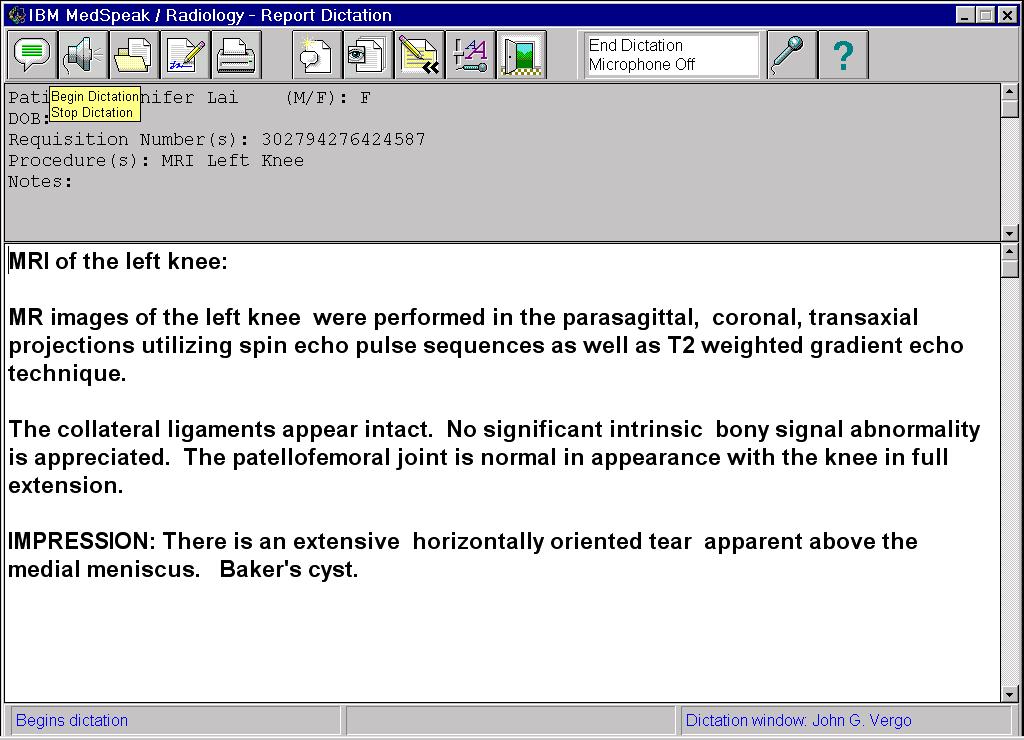
Figure 2. The dictation window in Primary user mode, after a report has been dictated. Bubble help for the Begin/Stop Dictation icon is visible in the upper left.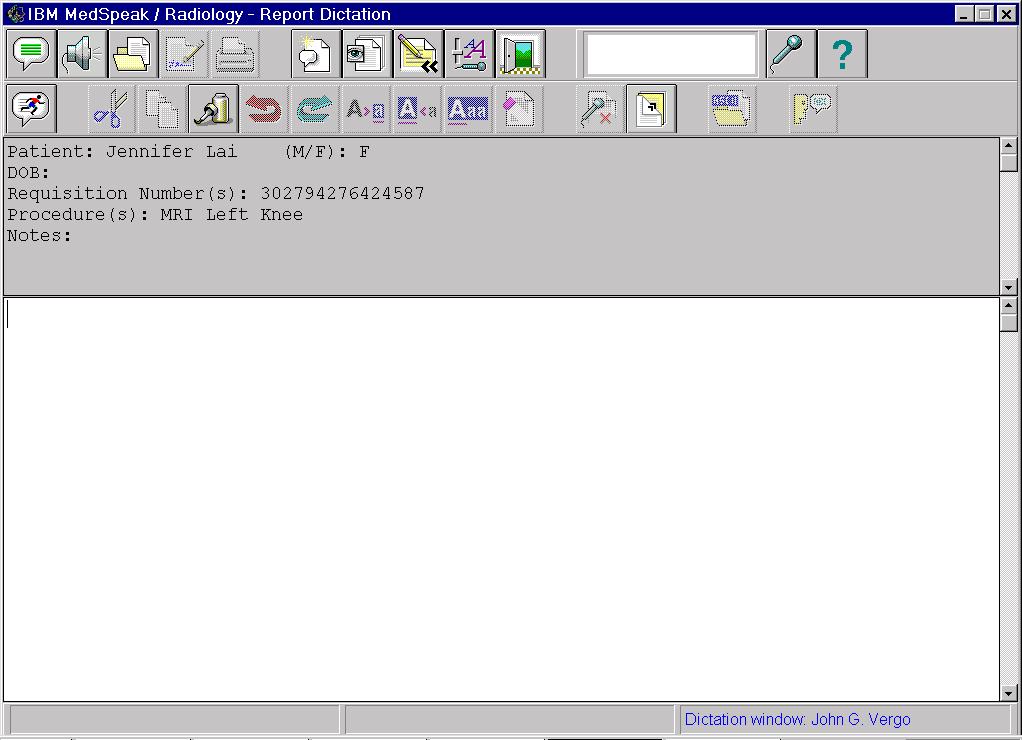
There were four phases to the project, each culminating in a four week period during which new versions of the software were installed at the client sites. The first two were alpha phases, where we delivered limited function. In alpha we concentrated on establishing a framework for the UI that the radiologists were comfortable with, as well as refining the requirements for additional functions. The last two phases were a beta and an early product phase. At beta we had all the functions but were lacking certain support features such as the online help. Finally, the early product version gave us the opportunity to ensure the product was robust enough for the general radiology public, and to do a field evaluation of our printed guides. These sessions with the radiologists in their environment resulted in valuable feedback for the design team. They provided an open forum to discuss and probe function and usability issues. Not only were we able to iterate on the design of the user interface and application function, but we became aware of important issues regarding the speech engine itself, which we were able to address mid-project.
A dictation application comes with a default vocabulary, language model and set of pronunciations for dictation. Each of these can be extended for individual users. A dictation vocabulary is a set of words that the recognition engine uses to translate dictated speech to text. As part of the decoding process, the engine matches the acoustics from the speech input to words in the vocabulary. Therefore, only words in the vocabulary are capable of being recognized. If a user wishes to dictate a word that is not in the dictation vocabulary, it must first be added.
A language model is a domain specific database of sequences of words in the vocabulary, along with the probabilities of the words occurring in a specific order. The language model assists the recognizer in decoding dictated speech by biasing the output of the speech system towards high probability word sequences. If the user speaks a sequence of words that have a high probability within the language model, the recognition engine has a better chance of correctly decoding the speech than if the user speaks an unusual sequence of words. Within a language domain such as radiology or general English, perplexity is a measurement of the number of equally likely word choices given a sequence of words [10]. In a high perplexity domain such as general English, it is more difficult to predict a word given its preceding words in a sentence, due to the large number of equally likely words that may follow. The radiology domain has a low perplexity than general English, which leads to higher accuracy.
Each word in the vocabulary has one or more pronunciations (for example, po-ta-to and po-tah-to). If a user's pronunciation differs from the pronunciation provided with the system, he can add his own pronunciation for a particular word.
Philips Dictation Systems [9] offers accurate continuous speech recognition technology with its core engine product SpeechMagic. The radiology prototype works by having the doctor dictate the entire report prior to submitting the audio for transcription. Once transcribed, the text is available for editing, correction and playback.
StoryWriter [2] is a speech oriented editor, that was developed for use by reporters who suffer from Repetitive Stress Injury (RSI). While this system required discrete speech, it was favorably received by the user group because it allowed them to do their job in spite of the RSI.
As part of our decision to have functions directly available, we decided against a menu bar with the standard, hierarchical Windows function groupings, File, Edit, etc.. We only have toolbars with icon buttons where the icons correspond to functions in the application. Each function available on the toolbar can be activated by either clicking on the icon or saying the associated voice command. The use of a bar code reader to enter the requisite patient record number further streamlines the process. We had several iterations on both placement and content of the function toolbars. By Beta, we had implemented Primary user and Advanced user modes, which correspond to the number and complexity of functions that are visible to the user. It was important to set the different levels up in such a way that users could gain experience with the Primary level, gain confidence and feel curious to seek out additional functionality, and that the experience they had gained at the Primary level would transfer seamlessly to the next level. The field trial for Beta and early product was not long enough to follow radiologists in primary mode and determine how many moved to advanced mode, or why they chose to do so.
To achieve high throughput, it is critical that physicians not be slowed down by incorrectly recognized voice commands. We attempt to prevent these types of errors by using the accepted practice of dynamically enabling vocabularies that are limited to the set of legal commands that the user can use, based on the state of the system. As the application moves from one state to another, we constantly match the active vocabulary to what can be said by the user. For example, when MedSpeak presents the user with a modal dialog with three buttons on it, we disable all vocabularies except one that has the words Continue, Cancel, and Help in it. These three words become the only words the engine can recognize. The perplexity is equal to three [10] and the number of possible incorrectly recognized words is greatly reduced.
The greatest challenge to achieving report creation times comparable to the existing process is that the editing and correction of reports that were previously done by the transcriptionist are now done by the radiologist. Streamlining these functions was an important success factor in our design. Correcting recognition errors that occur during dictation is an involved task, and we changed our original approach as a result of field observations. There are two goals in correcting recognition errors. The first is to have a correct report. The second is to take advantage of the correction to increase the accuracy of subsequent dictations.
Recognition errors occur for many reasons. Some causes, such as ambient noise or the speaker stumbling on a word, are difficult to adjust for. Other reasons, such as a word that is not in the vocabulary, a speaker who pronounces a word differently, or who uses words in unusual sequences, can be addressed. When a speaker corrects a recognition error, we can capitalize on the action by adding new words to the vocabulary, and updating the language model with the context of the corrected word. Updating the pronunciation of the corrected word presents a unique problem with continuous speech. Since the original pronunciation of the word is corrupt due to coarticulation, a new, discrete pronunciation has to be provided by the user. This led to an error correction control panel in our original interface that is represented in figure 3.
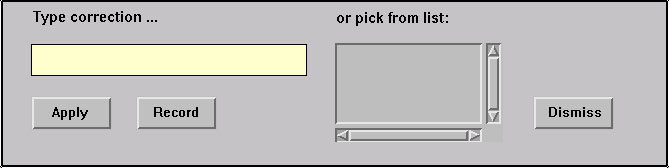
Figure 3. Error correction controls.
To correct a recognition error, the user highlights a word in the text of the report. The word appears in the correction text edit field, and the alternate word list is populated with other likely word choices. The user either types the correct word, or chooses it from the alternate word list. The final (and optional) step prior to applying the correction is the recording of a new pronunciation. The recording is done by pressing a button with the mouse, speaking the word, and pressing the button a second time to terminate the recording. If the acoustics of the recording can not be matched to the spelling of the word, the user is prompted to provide a "sounds-like" spelling to help the recognition engine build an internal representation of the pronunciation.
We observed two major problems with this procedure. First, all users including the most computer literate found this to be a difficult procedure to learn and remember, and a cumbersome and lengthy process to follow when correcting a simple error. The second problem stems from the fact that this correction procedure is intended to be used only to correct errors made by the recognition engine. In practice, other types of errors appear in a report. For example, the user may dictate a sentence and then change his mind about what he wants to say. In this case, we instruct the user to re-dictate the sentence, or to use the keyboard and mouse directly in the report rather than correcting the text with the specialized error correction control. We observed a lot of confusion from users trying to decide which technique to use when correcting errors.
The final resolution to the correction issue was to completely remove the error correction control panel. Users now make all corrections in the body of the report. Corrections can be made with keyboard and mouse, or they may re-dictate portions of the report by placing the cursor at an appropriate spot in the text and dictating. Most radiologists found this approach much easier to deal with. Words are added to the vocabulary and the language model is updated when the user electronically signs the report. In practice new words are rarely used, and the entire procedure has the appearance and behavior of a typical editing session to the user. When a new word is detected, the user is prompted to provide a pronunciation for it. A separate dialog is provided to allow the user to optionally give the system a pronunciation of an existing word, if the recognition engine consistently mis-recognizes it.
When dictating, radiologists focus intently on the film being read, and are unwilling to shift their attention between the film and MedSpeak. We support this requirement for "eyes free" dictation by giving the radiologist the ability to correct errors after dictating the entire report. We also provide audio and visual feedback, in the form of beeps and significant screen color changes to indicate that the voice commands to start and stop dictation have been recognized by MedSpeak.
In addition to getting the patient reports back out to the referring doctors much more quickly, one can speculate that using MedSpeak improves patient care another way. If a radiologist can sign a report while the film is still in front of him, there is less chance of a report going out that does not accurately reflect the findings.
Radiologists were very enthusiastic about the sense of closure that they got using MedSpeak. Many told us they dreaded coming in on Mondays to a long list of reports, dictated on Friday, awaiting signature.
Not all users were dissatisfied with the current process. For many radiologists, the legacy system was not truly perceived as a problem for them. The impact of the long turn around time on reports was felt more by the administrative side of the hospital than by radiologists. In user questionnaires distributed at our alpha/beta sites, several radiologists mentioned the problem of delays in transcription and long turn around time for reports. However, when these same users were asked to quantify how satisfied they were with their current system, they indicated that they were either satisfied or very satisfied.
Some users were computer averse. Some of the doctors were comfortable speaking to a computer and using a mouse. This included many of the residents and those that had recently completed medical school; having been exposed to the use of computers in school. Others, especially those that had spent much of their career creating reports with either a dedicated typist at their side, or by dictating into a tape recorder, were reluctant to start using a computer. Even some of the doctors who are comfortable with computers found that they are uncomfortable relying on speech recognition. One of the residents we worked with said that he knew how to use computers, and he knew how to dictate reports, but he "felt strange speaking to the computer" and that it made him "feel like he had to talk like a robot".
The new system entailed a change in roles. It is not uncommon that the introduction of new technology changes roles in a way that does not always benefit the person using it. Radiologists objected to assuming the additional editing and correction tasks that had previously been the responsibility of transcriptionist. One doctor told us: "when I put my hands on the keyboard I am doing an administrative task and no longer functioning as a physician."
The following findings are associated with using speech to create reports.
The variability of the accuracy was disquieting to some. Those that are familiar with speech recognition know that the acoustics of a given word are rarely identical and therefore can be decoded correctly on some occasions and incorrectly on others. This is due to coarticulation and a normal variance in the user's speech. Background noise used to play a significant role in accuracy but no longer does, due to the great progress in noise-canceling microphones. However, highly accurate microphones are also prone to some sensitivity. Proximity to the mouth, angle and customized volume setting of the microphone can cause a variance in accuracy. Doctors were oblivious to the mic volume indicator once they turned their attention to the film. An audio signal may have been useful here. We saw a temporary decrease in accuracy that resulted from the microphone being left on while not in use since automatic and continuous adaptation to speaker volume occurs. This lack of predictability in the accuracy made it difficult for users to build and maintain a useful conceptual model of the application [8].
The difficulty of remembering spoken commands. Most new users received an average training time of one hour. With this amount of training, users would function well with some coaching, but if left to their own resources would forget what the sequence of events was and what the required spoken command was. We noticed this in our first alpha phase, and built in the possibility of using alternate commands. For example, the system will accept either Begin Dictation, or Start Dictation, and New Report is an alternate for Dictate New Report. Still, we saw users saying New Dictation when they meant New Report. We added a help feature that would display the entire list of active commands at a given point in time, when the user said "What Can I Say". Additionally hints can be obtained by positioning the cursor over the icon button. We found that the doctors made little use of What Can I Say, and only resorted to the hints as a last resort. Most radiologists who had not learned a path through the system relied on a pocket reference card for the 2 or 3 critical commands they needed.
MedSpeak took more of the radiologists' time. Table 1 shows the average time (in seconds) it took for a radiologist to create a report using both their current system and MedSpeak (MS).
| Current System | MS with < 5 usage | MS with > 5 usage | |
|---|---|---|---|
| Control | 72 | 146 | 114 |
| Production | 81 | N/A | 109 |
The times include dictation, editing and signature of the reports on each system. We timed 7 users to obtain the control numbers, and 4 of those 7 users for the production timings. We divided the users between those that had more than 5 hours of experience with MedSpeak, and those that had less than 5 hours, to reflect time that was due solely to the newness of the system. In all cases, the users had less than 15 hours experience with MedSpeak. This compares with their current reporting system where the levels of experience vary between 7 and 15 years.
The control times are the results of a controlled study in which each user was timed reading a set of 10 films on their current system, and 10 using MedSpeak. Both sets consisted of highly comparable films with regard to film type (Xrays, MRIs, etc..) and difficulty (degrees of normality or abnormality). The order of the sets was alternated so that one user would use Set 1 with MedSpeak and Set 2 with their current system, and the next user would do the opposite to account for order effects. While it was clear from the doctors' comments that they were moving through the films much more quickly than they normally would because they knew that it did not correspond to real people, we believe that this factor had the same effect on MedSpeak as on the current system.
The production times are the average of timings taken while the doctors were interpreting real patient's films. Seventy films of varying type and difficulty were timed. The control times show that users with less than 5 hours of usage on MedSpeak took twice as long to create a report using MedSpeak. Users with at least 5 hours of experience took 1.6 times as long and in production mode this ratio dropped to 1.35. We believe this reflects the fact that when it came time to use MedSpeak in the high pressure mode of what is referred to as online reading, radiologists may have compensated for what they knew to be the additional time requirements of using a speech system by shortening their reports, or relaxing their standards for polish of the text. We observed physicians signing MedSpeak reports with minor recognition errors that did not change the meaning of the text.
The reports took longer to create using MedSpeak because the radiologists were spending more time editing and correcting their reports. This is tied to 2 things. First, more corrections were required when using MedSpeak. When using a Dictaphone to record a report that will be transcribed by a person who has in many cases learned the particular style of a given radiologist, the doctor has the freedom to change his mind two words into a sentence, and the listener will understand that the following words are to supersede what has just preceded. With intonation and pace, he can correct himself if he says "left..RIGHT" and the transcriber will know he meant right. Very often, a transcriptionist will intercede with human understanding and make corrections as required. For example, if the doctor has referenced a 3 millimeter mass in several places in the body of the report, and then in conclusion states the patient has a 3 centimeter mass, the transcriptionist can take an appropriate corrective action. Lastly, humans are superior to speech recognition systems at filtering the troublesome aspects of spontaneous speech such as "Umms", "Ahhhs", and other disfluencies. The second reason reports took longer was due to the difference in the nature of the errors made. Errors made by the transcriptionist were usually spelling mistakes that did not change the meaning of the text. If the transcriptionist can not hear what the doctor said, he places a blank line or a series of XXXs in the report. These can be scanned for quickly by the doctor. By contrast, speech errors can change the meaning of the report. For example, in the case of a deletion error, if a doctor says "there is no sign of cancer", it can be decoded as "there is sign of cancer". The radiologist has to carefully read each word, rather than quickly scanning the report.
| User 1 | User 2 | User 3 | Avg. | |
|---|---|---|---|---|
| Alpha | 7.56% | 5.51% | 9.79% | 7.62% |
| Product | 3.02% | 2.91% | N/A | 2.97% |
Table 3 shows average navigation error levels for 3 users dictating between 70 and 86 commands each. We differentiated between errors when the wrong command was recognized (misrecognized), and when the engine was unable to come up with a command match at all, and the user was asked to try again (unrecognized). Unrecognized commands sometimes caused users to sit and wait for the command to be executed. This may have been due to the subtlety of the feedback given to the users when a command was unrecognized.
| User 1 | User 2 | User 3 | Avg. | |
|---|---|---|---|---|
| Misrecognized | 1.3% | 4.3% | 4.7% | 3.4% |
| Unrecognized | 0% | 2.9% | 1.2% | 1.4% |
| Total | 1.3% | 7.2% | 5.9% | 4.8% |
We observed confusion and hesitation when commands were not recognized. MedSpeak could be improved by providing rapid and clear feedback to the user when a command is not recognized. The use of color in the command history window and/or sound (in the form of a beep) could be explored in future usability studies.
Additional work is required to move MedSpeak into the domain of a "hands free" application. Currently, not all functions are controllable by voice. List manipulations, form filling, setting of radio buttons and form navigation need voice control added. The number recognition and word spelling functions need improvement. We did provide voice controlled features to allow cursor placement and selection of text within the dictated text. We have fast forward and reverse controls that select text on a word or line basis. The selection can be cumulative, or the highlighted word can follow the cursor. This feature is rarely used, and further work is required for useful "hands free" voice controlled error correction and editing.
A common source of recognition errors is the improper use of the microphone. Problems include microphone gain settings, and incorrect microphone positioning by the user. A microphone wizard that detects these problems and interactively helps the user through the process of correcting them would be useful.
A true hands-free interface to our application would be a significant improvement. Fully speech enabling the application with efficient means of editing and correcting text by voice would allow the radiologist to better focus on the task of interpreting films, instead of having to be aware of how to interact with the MedSpeak application.
While MedSpeak was very well received by many radiologists, it was not met with universal acceptance. However, many people who refused to use discrete speech applications did find MedSpeak to be highly useful. One radiologist said "We have been following speech recognition technology for 10 years, mostly with great disappointment, until our experience with the MedSpeak/Radiology system". The primary objection of the radiologists who did not embrace the system is that it is not 100% accurate. As our recognition accuracy continues to improve from 97% we expect the vast majority of objections to speech recognition technology to fall by the wayside.
2. Danis, C. et.al. Story Writer: A Speech Oriented Editor. CHI '94 Conference companion, pp. 277-278
3. Danis, C. and Karat, J. Technology-Driven Design of Speech Recognition Systems. In Proceedings DIS, 1995
4. Grasso, M. Automated Speech Recognition in Medical Applications. MD Computing, n1, v12, Jan. 11 1995, pp16-23
5. Hemphill, C.T. Surfing the Web by Voice. Proc. Multimedia 95, Addison Wesley Reading Mass., 1995 pp. 215-222
6. Lerner, E.J. Talking to Your Computer. IBM Research Magazine, Number 3, 1994, pp. 8-14
7. Martin, Crabb, Adams, Baatz, Yankelovich SpeechActs: A Spoken-Language Framework. Computer, IEEE Computer Society, July 1996, pp. 33-40
8. Yankelovich, Nicole Designing Speech Acts: Issues in Speech User Interfaces CHI '95 pp. 369 - 376
9. Philips Dictation Systems. Available as http://www.speech.be.philips.com/products.htm
10. Schmandt, Christopher Voice Communication with Computers. Van Nostrand Reinhold, New York 1994
MedSpeak and MedSpeak/Radiology are registered trademarks belonging to the IBM Corporation.
|
|