


|
|
Thomas Baudel, Gordon Kurtenbach, George Fitzmaurice
A novel input device called the Rockin'Mouse is described and evaluated. The Rockin'Mouse is a four degree-of-freedom input device that has the same shape as a regular mouse except that the bottom of the Rockin'Mouse is rounded so that it can be tilted. This tilting can be used to control two extra degrees of freedom, thus making it suitable for manipulation in 3D environments. Like the regular mouse, the Rockin'Mouse can sense planar position and perform all the usual functions. However, in a 3D scene a regular mouse can only operate on 2 dimensions at a time and therefore manipulation in 3D requires a way to switch between dimensions. With the Rockin'Mouse, however, all the dimensions can be simultaneously controlled. In this paper we describe our design rationale behind the Rockin'Mouse, and present an experiment which compares the Rockin'Mouse to the standard mouse in a typical 3D interaction task. Our results indicate that the Rockin'Mouse is 30% faster and is a promising device for both 2D and 3D interaction.
3D interaction, input devices, integral motion, mouse, 3D graphical manipulators.
The ever increasing speed of computers in recent years has led to the proliferation of tools for creating and manipulating 3D graphics. While the visuals produced by state-of-the-art 3D graphics systems are of very high quality, interaction techniques for manipulation within these systems often suffer from the limitations of currently available input devices.
These interaction techniques can be broadly classified into two categories: those based on three or more degree-of-freedom input devices [7, 11, 12, 16, 19, 21, 22], and those which rely on the ubiquitous mouse coupled with a variety of schemes for mapping 2D input to 3D control [3, 5, 6, 8, 15, 18]. At first glance, it would seem that the increased sense of directness usually afforded by the techniques in the first category would make multiple degree-of-freedom input devices the obvious choice for 3D applications. In reality, however, the mouse continues to be the dominant input device in the world of 3D graphics.
A key contributing factor to the mouse's preeminence is that most users of 3D graphics applications do not work exclusively in 3D; rather, in a typical scenario a user is likely to frequently switch between 2D and 3D applications. In addition, even 3D applications usually require a substantial amount of 2D interaction - manipulating 3D objects in 2D views as well as the usual 2D tasks of selecting items from menus, typing text, etc. While the mouse is indisputably a good device for 2D interaction, it performs only adequately in 3D tasks. Practically all existing 3D devices, however, perform poorly in 2D tasks when compared to the mouse. Therefore, it comes as no surprise that users pick the mouse as their all-purpose input device. They are clearly prepared to sacrifice peak 3D performance to avoid having to constantly switch between the mouse and a device better suited to 3D interaction. This leads us to the obvious conclusion that what is needed is an input device that performs reasonably well for both 2D and 3D tasks.
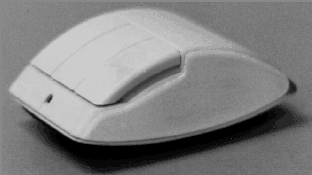
In this paper, we first explore the properties of the mouse that make it so successful. We then describe a new device, the Rockin'Mouse (Figure 1), which incorporates these properties while providing simultaneous control over four degrees of freedom. Finally, we present the results of an experiment to investigate the performance of the Rockin'Mouse vs. the mouse in a typical 3D interaction task.
Designers of new input devices often evaluate them based on criteria such as task completion times for pointing to or manipulating on-screen widgets. While this style of evaluation is certainly valid, it is incomplete. There are a host of other properties and issues at play that determine whether or not a device will be successful and widely adopted.
In trying to understand why the mouse has enjoyed quite a bit of success over the past two decades or so, we found that - apart from the convenience factor discussed in the introduction - it has many subtle redeeming properties that should be taken into account when designing a new input device:
The physical form of the mouse, coupled with the fact that it operates on a flat horizontal surface, ensures that the user is not restricted to any particular grip. The mouse can be used in a variety of ways - ranging from a precision grip for accurate movements, to "lazy" or "relaxed" grips when simply moving the cursor from one window to another. Also, the user's arm is generally resting on a table while moving the mouse. This is less fatiguing when compared to using 3D devices like the Bat [21], Polhemus 3Ball [16], and Logitech 3D/6D [12] mouse, all of which require the user's arm to be suspended in 3D space.
Since the mouse is fairly heavy and has a large area in contact with the surface it moves on, tremor in a user's hand is dampened, allowing for precision operation. In contrast, free-floating 3D devices [12, 16, 21] and stylus' on digitizing tablets [20] tend to transmit, and in some cases amplify, human hand tremor.
Also, the mouse is usually in a stable state where it is ready to be used and does not have to be "disturbed" to acquire or release the device. The position of stylus and 3D devices, however, will be disturbed when a user picks up the device up or puts it down.
Input devices can either report their absolute measured position or their current position relative to some key point (usually the point when the device was engaged). Because the mouse is a relative device with implicit clutching, the amount of arm movement required to effectively use it can be very small. Thus, the user need not expend much effort when working with the mouse. Further, relative devices do not suffer from the "nulling problem" [1] associated with absolute ones.
The implicit clutching mechanism - lifting the mouse off and replacing it on the work-surface to engage and disengage it - is easily understood and executed. It is also flexible and comfortable when compared to using an explicit clutch button like that found on other devices [12, 16, 21].
Zhai [23] has shown that for common 3D tasks such as object manipulation, position control input devices are superior to rate control devices. In the 2D world, position control is critical for pointing tasks. It also allows for reversible actions: for example, a designer using a position control device to manipulate the camera view in a 3D modeling application can "spin the world around" to get a quick look of the model from a different viewpoint and then return to the original view and continue working, all within a split second. This type of action, performed many times a day by users of such applications, is practically impossible with force sensing rate control devices like the Magellan [11].
We note that some tasks such as navigation in large scenes are more suited to rate control. However, the mouse can easily be used as a rate control device by employing a first order transfer function. The converse is not true: force sensing devices cannot operate in position control mode.
The default mapping of mouse motion to cursor motion is "natural" (i.e., moving the mouse forward moves the cursor up, moving the mouse left moves the cursor left, etc.). This reduces the cognitive load imposed on the user since the mapping is simple. Most position control 3D devices [12, 16, 21] have this feature, while force sensing devices [11] often use more complicated device to cursor mappings.
The direction of movement of the mouse buttons are orthogonal to the sensing dimensions of the mouse. Thus, it is easy to operate the buttons without inadvertently moving the cursor. This is one reason why "3D mice" which use a thumbwheel to control the third degree of freedom [19] have not been very successful.
Our final point has to do with the nature of human beings. We humans like to deal with things we're familiar with, and we are extremely familiar with the form and function of the mouse. Indeed, an entire generation has grown up using it. We believe that a device that radically differs from the mouse will have to deliver correspondingly high performance improvements in order to gain widespread acceptance. Unfortunately, given our high level of skill with the mouse, it is unlikely that any new device could facilitate performance improvements of the required magnitude. Instead, an incremental change in design leading to an evolution in the quality of interaction will likely result in a more successful input device.
The factors described above make the mouse an almost perfect 2D input device. While these factors are equally critical in 3D interaction, the mouse does not inherently support 3D operations. Over the years, several mechanisms have been developed to enable 3D manipulation using only the two degrees of freedom provided by the mouse.
The simplest method, from a systems standpoint, is to use modifier keys (sometimes called hot-keys) or the mouse buttons to switch between movement in the three axes. This scheme, while adequate, is rather unnatural. First, the user has to remember which key selects a particular axis of movement, and second, in what direction to move the mouse to accomplish the desired movement.
More effective schemes which exploit the visual channel have been proposed by researchers [3, 5, 6, 8, 15, 18] and are currently implemented in several commercially available applications. The key idea here is that the 2D mouse cursor is used to select a virtual "manipulator" (also called "handle", "controller", or "3D widget") associated with a particular transformation. For example, to effect translational motion along the x-axis(1), one would select the x-axis translational manipulator for the desired object and drag it to the required location. Obviously, since the mouse provides only two degrees of freedom, the manipulators generally allow only transformations along two dimensions at a time (there are exceptions to this rule: uniform scaling along three dimensions is an example).
The problem with these schemes is that they often reduce a task that would ideally be performed in a single integral movement into two or more sub-tasks. For instance, using virtual translational manipulators to move an object in 3D space requires at least two motions: one motion along the x-y plane followed by another motion along the x-z plane. While the user can still perform the task, the interaction technique differs from the user's experience with the physical world, thus incurring an additional cognitive cost. This problem is even more acute when the task absolutely requires simultaneous manipulation of all three dimensions: for example, specifying a 3D motion path of an object in real time - a task commonly performed in 3D animation software.
Buxton [1], Card et al. [4], and Jacob et al. [9, 10] have all emphasized the need for input devices to match the user's high-level conceptual model of the task. Indeed, Jacob et al. [9, 10] have shown that tasks in which the conceptual model of manipulation integrates all dimensions benefit from input devices which also support this integration. They also point out the opposite: that multiple degree-of-freedom tasks where the dimensions are conceptually independent (e.g., adjusting object position and color) do not benefit from input devices which integrate all dimensions.
The Rockin'Mouse (Figure 1) is a new input device designed to retain the characteristics of the mouse which make it so successful while overcoming it's main shortfall by providing a seamless shift into integral 3D manipulation when desired.
Like a regular mouse, the Rockin'Mouse senses it's position on the surface of operation. In addition, a novel curved base design allows the mouse to be tilted about the x and z axes (Figure 2). The amount of tilt is sensed and can control two extra degrees of freedom.
While the base can be curved in a variety of ways, our preferred implementation uses an asymmetric curvature about the two axes. The curvature about the z-axis is greater than that about the x-axis, resulting in a similar footprint to the regular mouse. The Rockin'Mouse has a flat spot at the centre of the curved base to make it self-righting and improve stability. An interesting artifact of this flat spot is that it allows the device to be physically constrained to control only two degrees of freedom even while sensing four. This is often desirable when manipulating 3D objects.
The Rockin'Mouse, like the mouse, is a relative device where clutching is accomplished by lifting the mouse off and replacing it on the work-surface.
Our prototype implementation (Figures 1 & 2) operates on a Wacom digitizing tablet [20]. This tablet is able to sense the position of a cordless sensor on the x-z plane of tablet and also the degree of tilt of the sensor about the x and z axes.
One of these cordless sensors is mounted in the center of the Rockin'Mouse, enabling the device's planar and angular position to be sensed when placed on the tablet. The current resolution of the tilt sensor is approximately one unit per degree. While this is insufficient for regular use, it suffices for evaluating our design. The tablet can also sense the state of Rockin'Mouse buttons connected to the sensor.

The mechanism that enables implicit clutching consists of a contact switch between the curved base and the upper body of the mouse. The curved base is not tightly screwed to the upper body, instead 1 mm of vertical "play" enables the contact switch to open and close.
It is our belief that although the tilting action of the Rockin'Mouse is not symmetric to the planar movements, simultaneous control of multiple degrees of freedom is possible if appropriate interaction techniques are used. This is what distinguishes the Rockin'Mouse from other mice variants [13, 19] which do not enable integral action of all sensed degrees of freedom. The ability to simultaneously control all dimensions of an integral task should result in performance improvements over the traditional mouse and manipulators. This advantage could be utilized in numerous applications.
In order to investigate these beliefs, we conducted an experiment:
The primary goal of the experiment was to evaluate the effectiveness of the Rockin'Mouse compared to the mouse in the context of a 3D object positioning task. We were particularly interested in whether or not subjects would be able to control movement in all three dimensions simultaneously using the Rockin'Mouse and if this translated to an improvement in task performance time. We were also interested in determining the learning effects associated with the Rockin'Mouse.
The experiment was conducted on a Silicon Graphics Indigo2 Extreme workstation with a 19 inch colour display and standard mechanical mouse. The Rockin'Mouse operated on a 12x12 inch Wacom digitizing tablet [20] attached to the workstation via a 19200 bps serial connection. The workstation ran in single-user mode, disconnected from all network traffic. A graphics update rate of 30 hz was maintained. Subjects were seated approximately 60 cm in front of the display with their right hand manipulating the mouse or Rockin'Mouse on the digitizing tablet placed to the right of the display (Figure 3).

The 3D object positioning task required subjects to move an object from one corner of the virtual 3D scene and place it inside another object located at the diagonally opposite corner.
As illustrated in Figure 4, the lit scene consisted of two light grey wireframe grids drawn in the horizontal plane at the top and bottom of the screen. The purpose of these grids was to enhance the perception of depth in our perspective display. The object to be manipulated was a gold coloured sphere surrounded by a wireframe bounding box. The target object was a purple cube with translucent faces. Colours and transparency effects were chosen to ensure that subjects were not hindered in their task by insufficient visual cues. The manipulated object was two thirds the size of the target.

In the mouse conditions, subjects used the left mouse button to select one of three translational manipulators. Clicking on the front face of the object's bounding box selected the x-y manipulator while the y-z and x-z manipulators were selected by clicking on the left/right and top/bottom faces respectively. Holding the left button down and moving the mouse effected 2D movement of the object in the active manipulator's plane. Therefore, a single 3D movement required subjects to switch between at least two manipulators.
In the Rockin'Mouse condition, pressing the left button selected the entire object. Moving the Rockin'Mouse left-right and forward-backward on the tablet caused the object to move in the x-direction and z-direction respectively. Tilting the Rockin'Mouse clockwise-anticlockwise moved the object up-down in the y-direction. Linear control-display mappings were used for both devices.
In both conditions, the target turned bright green when the object was within its boundaries. Subjects released the left button while the object was within the target to indicate completion of a trial.
Fourteen volunteers (13 male, 1 female) served as subjects in this experiment. All were right handed. Three regularly used the mouse with graphical manipulators in 3D scenes, while the remaining eleven were familiar with 2D use of the mouse but had limited experience with 3D environments.
A balanced within-subjects repeated measures design was used. Each subject was tested with both devices on the same day. For each of the devices, subjects were given six blocks of trials. Each block consisted of eight conditions: we tested subject's ability to move an object from each of the eight corners of the viewing volume to a target located at the diagonally opposite corner. For reasons that will be elaborated on shortly, subjects performed four trials in a row for each condition. All eight "direction of movement" conditions were presented in random order during the block. The experiment consisted of 5376 trials in total, computed as follows:
14 subjects x
2 devices per subject x
6 blocks per device x
8 conditions per block x
4 trials per condition
= 5376 total trials.
Prior to performing the experiment with each device, subjects were shown how to operate the device and were given practice trials for each condition. Practice lasted about fifteen minutes. For each device, subjects took between thirty and forty-five minutes to perform all the trials. They were allowed to take short breaks between each condition, but were required to complete all four trials within a condition without breaks. Timing began when the object appeared on screen and ended when it had successfully been placed inside the target. There was a 800 ms pause before the next trial began. Subjects were alternately assigned to one of two experimental orders: Rockin'Mouse first (R/M) or mouse first (M/R).
A short questionnaire designed to elicit subjective opinions of the two devices and associated interaction technique was administered at the end of the experiment.
An analysis of data from pilot tests showed that the task was divided into two phases: an initial open-loop or ballistic phase which gets the object in the vicinity of the target, followed by one or more closed-loop movements which precisely positions the object within the target. With the mouse, the ballistic phase is usually performed with two 2D movements. With the Rockin'Mouse, the ballistic phase can be accomplished with a single 3D movement. However, we believe that the cognitive load imposed on the subject when planning the more complex 3D gesture is higher than for the mouse's simpler 2D movement. In other words, the "chunk" [2] of the problem being solved is larger. Our hypothesis is that subjects will eventually be able to perform this planning automatically, however, much learning through repetition is likely required [14].
Although we were interested in determining subjects' performance before and after this learning occurred, the experiment was too short to allow subjects to reach expert levels of performance. Therefore, we designed a compromise solution: for each of the eight conditions, subjects performed four trials in a row. For each trial, the target appeared at a slightly different position in the vicinity of the pertinent corner for that condition. This essentially prevented subjects from memorizing the exact location of the target from trial to trial, ensuring that the non-ballistic portion of the task always required closed-loop control. For the initial ballistic phase, however, most of the planning would likely occur during the first trial. Since the last three trials require the same ballistic movement, subjects would not have to plan the movement again. Thus, performance in the last three trials would closely approximate how subjects would perform after substantial learning.
Figure 5 compares subjects' mean trial completion times with both devices for each of the six blocks. A repeated measures analysis of variance with trial completion time as the dependent variable showed the Rockin'Mouse performing significantly better than the mouse (F1,12 = 21.08, p < .001). Overall, despite the limited tilt resolution, subjects were able to complete the task 30% faster with the Rockin'Mouse.

The order of presentation (R/M or M/R) had no significant effect (F1,12 < 0.1, p > .5) on the performance differences between the two devices. This, coupled with the absence of any Device x Order interaction (F1,12 < 0.5, p > .5), effectively ruled out the possibility of asymmetrical skill transfer - an oft overlooked artifact of within-subjects designs [17].
Direction of movement also had no effect on the performance differences between the devices (F7,84 = 1.75, p > .1). Apart from the learning effects discussed below, no other significant interactions were observed.
As apparent from Figure 5, subjects' performance with both devices improved over the course of the experimental blocks (F5,60 = 23.01, p < .0001). Also, the performance differences between the two devices were independent of block, as shown by the lack of a significant Device x Block interaction (F5,60 < 1, p > .5).
In addition to learning across blocks, there was also significant learning occurring over the four repeated trials within each condition (F3,36 = 52.28, p < .0001). A significant Device x Trial interaction (F3,36 = 13.69, p < .0001) was also apparent. As anticipated during the design of the experiment, the task completion time for the Rockin'Mouse in the first trial of each condition, while still faster than the mouse, is much slower when compared to the subsequent three trials (Figure 6). The performance of the mouse, however, does not significantly change over the four trials - evidence that the cognitive requirements of the ballistic phase of the task are spread throughout the several required 2D sub-movements.

The results show that when faced with a completely new movement condition, subjects required an average of about 1.5 seconds to plan the ballistic gesture for the Rockin'Mouse. If this planning is preprocessed, as in the last three trials per condition, subjects were 40% faster with the Rockin'Mouse. Of obvious interest, therefore, is the validity of our hypothesis that the cognitive cost of planning is reduced with practice.
In order to further explore this premise, we examined the performance difference between the two devices for only the first trial of each condition over the course of the six experimental blocks (Figure 7). As expected, the difference between the two devices increases as subjects get more skilled at the task, reaching statistical significance (p < .05) after block five. While more data is clearly needed to conclusively verify our hypothesis, this trend is a good indication that we are on the right track.

We also note that three of our subjects had substantial previous experience using the mouse with manipulators. Data collected from these subjects are probably skewing our results in favour of the mouse. However, since the Rockin'Mouse outperforms the mouse despite this bias, we decided not to present separate analyses for the expert and novice subjects.
As mentioned earlier, one aim of this experiment was to see if subjects could perform tilting and planar movements of the Rockin'Mouse concurrently, thus enabling integral 3D manipulation. We adopted a technique described by Jacob et al. [10] to quantify the level of integration achieved with the Rockin'Mouse. Essentially, the trajectory of the object during each trial was divided into small segments, each representing a 10 ms time interval. For each segment we determined if the object had moved during that time interval (a 0.1 mm position change in any axis was considered movement). The segment was then classified as Euclidean(2) if movement occurred in all three dimensions, or city-block if movement was only in one or two dimensions.
For the selected movement threshold of 0.1 mm within each 10 ms time interval, across all subjects, 49% of all movements with the Rockin'Mouse were classified as Euclidean. Also, approximately 70% of the Euclidean movements occurred during the first half of the trial - that is, primarily during the ballistic phase of the task. This is not surprising since during the final closed-loop phase of the task, subjects are fine-tuning the position of the object, usually one dimension at a time.
These results clearly indicate that, where appropriate, subjects were able to control three dimensions simultaneously with the Rockin'Mouse. It is noteworthy that this level of integration was achieved despite limited practice.
Upon completion of the experimental trials, subjects filled out a questionnaire. Eleven of the fourteen subjects preferred the Rockin'Mouse to the mouse for the given task. Interestingly, two of the subjects who preferred the Rockin'Mouse were expert manipulator users. Finally, all the subjects said they felt they were able to control all three dimensions simultaneously with the Rockin'Mouse.
The results of our experiment indicate that the Rockin'Mouse is a promising device for integral 3D interaction. However, more work is clearly required to gain a better understanding of the capabilities, and limitations, of the device. In particular, we are interested in the long term learning effects: will users be able to significantly reduce the cognitive cost of planning the Rockin'Mouse's gesture? We also intend to explore different control-display mappings; for instance, first or second order control-display mappings may be appropriate for tasks such as navigating in 3D scenes.
In our experiment, left-right and forward-backward movements of the Rockin'Mouse controlled the object's movement in the x and z directions respectively, while clockwise-anticlockwise tilt controlled object movement in the y-direction. We felt that this was an intuitive mapping since it exploits the 1-1 mapping of device movement to object movement in two (x, z) of the three axes; however, alternative mappings clearly merit further investigation.
Aside from the new interaction techniques that will inevitably need to be developed for the Rockin'Mouse to be used in other interaction tasks using the dominant hand, use of the device in the non-dominant hand also merits investigation. For example, virtual camera control [22] could be performed using the non-dominant hand while the user interacts with objects in the scene with the dominant hand.
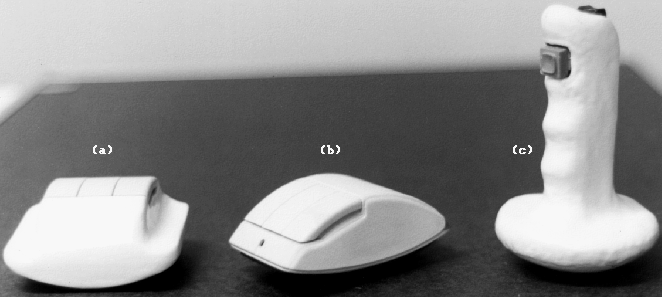
Despite our belief that close compatibility with the mouse is requisite for any device hoping to attain widespread use, we are nonetheless exploring alternative designs - two of which are shown in Figure 8. The base of the device in Figure 8(a) is curved about only one axis, allowing just a single dimension of tilt to be sensed. Since the area in contact with the working surface is larger than in the Rockin'Mouse, this device may afford greater stability. The device in Figure 8(c) has a base that is curved symmetrically about two axes, with a joystick-style grip. This device allows for a greater range of tilt and its form-factor may be ideal for entertainment applications. By investigating these variations we hope to gain deeper insights into the perceptual issues involved in interacting with this class of input devices.
Our experiment has shown that the Rockin'Mouse has the potential of providing at least a 30% performance gain over the regular mouse for 3D positioning tasks. We believe that for intensive 3D users, like professional 3D modelers and animators, this is a significant gain. It is also very encouraging that the Rockin'Mouse was preferred by the majority of our subjects (especially the expert mouse/manipulator users).
The results also indicate that subjects were able to simultaneously control all three dimensions. While this is clearly an acquired skill, the learning curve is acceptable. Finally, these positive results coupled with the fact that the Rockin'Mouse is backwardly compatible with the mouse make it potentially a very practical 3D input device
We thank Bill Buxton for valuable discussions during the course of this work. We'd also like to thank all the volunteers who participated in our experiment, and Shawn Lambino who converted our paper to HTML. We are grateful to Wacom Technology Corporation for generously providing the cordless tilt-position sensors that enabled us to prototype our design.
Alias|Wavefront Inc. is seeking trademark and patent protection for the Rockin'Mouse.
|
|