


|
|
Bonnie E. John
Craftsmanship is the result of a series of well-directed single efforts, each representing so much physical and mental power. Each of these efforts, therefore should be valued, so that no waste takes place, and the beauty of hand labour is seen largely in the "trick of the tool's true play" (pg. 28).
While such descriptions capture the essence of efficient tool usage, we do not yet understand how to get users to make efficient use of computer applications. A dominant goal of the HCI field has been to design facile interfaces that reduce the time to learn computer tools. This direction is expected to move users rapidly into production mode with the hope that they refine their skills through experience. However empirical studies of real-world usage show that even experienced users do not use computer tools efficiently. For example, our analysis of real-world CAD usage [4] has shown that although CAD users have few problems using the carefully designed tools available through the interface, they do not seem to acquire the knowledge to make efficient use of the system even after formal training and many years of experience.
We believe that the efficient use of computer tools is crucial to productivity and it is imperative that we understand its basic nature. This paper is an analysis of efficient usage and attempts to arrive at some general claims about that basic nature. We begin by asking the question "Can good design guarantee efficient usage?" An analysis of the use of everyday objects as well as sophisticated computer applications reveals that good design may not in itself guarantee efficient usage. Next, we ask the question "Can experience guarantee efficient usage?" To address this question we review the results from three empirical studies in different domains. These empirical studies reveal that experience is also not a good guarantor of efficient usage.
If good design and experience cannot provide the required knowledge to make efficient usage, what can? Based on the examples from the empirical data, we propose that the key to efficient usage resides in task decomposition strategies that exploit a device's capabilities - knowledge that must be made explicit to users during training. To understand the effects that strategies have on performance, we discuss the results from a GOMS analysis which confirms observations from another study. Finally we demonstrate some key task decomposition strategies that appear to generalize across different applications. We conclude by stressing the importance of identifying and teaching strategies to enable users to move from a sufficient to a more efficient use of computer tools.
Norman [16] suggested that an important aspect of a well-designed artifact is its affordance, which refers to "those fundamental properties that determine just how the thing could possibly be used" (pg. 9). Based on this principle, when a door is to be opened by pulling, a good design for its handle is a vertical bar that affords grasping and pulling; a poor design is a flat plate that affords pushing.
In the simple case where a person opens a door for herself, the above design is successful and can guarantee efficient usage. However, consider the slightly more complex task of a person opening a spring-loaded door for another person carrying a heavy load. In such a situation there are at least two ways to open the door regardless of the handle's design. One approach, as shown in Figure 1A, is to stand on the side of the handle and pull the door open. However, when this is done, the arm of the door-opener obstructs the entry for the person with the load. At this point, either the door-opener has to move out of the way by moving behind the person, or the person with the load has to hold the door ajar with a foot or shoulder. An efficient way to perform the same task (well known by doormen at hotels) is to stand on the side of the hinge before opening the door and therefore to provide unobstructed entry to the person with the load as shown in Figure 1B.

Figure 1. Inefficient and efficient methods for a door-opener (shown in black) to open a spring-loaded door for someone carrying a heavy load.
The above example demonstrates that although good design is essential in getting the task done, it cannot guarantee that the task is done efficiently. Feedback may provide crucial information through trial and error. However, it is difficult to demonstrate how a design for the handle itself could express immediately and unambiguously the efficient way of opening the door for someone else.
Another example of the design and efficient use of an everyday object is the hammer. The handle of a hammer could be designed to ergonomically fit the human hand as well as afford gripping. However it cannot tell the user that an efficient method to drive in a nail is: (1) tap the nail to guarantee its proper angle of entry and to hold it in place, (2) remove the fingers holding the nail, and (3) drive the nail in with heavier blows. While the design of everyday objects cannot guarantee their efficient usage, is that also true for more complex computer applications? After all, the interface design of computer applications typically have a much larger space of design possibilities. Consider the design of commands such as PLACE LINE, PLACE SHAPE, PATTERN AREA, and MIRROR-COPY in a CAD system. These commands have simple enough interfaces and are straightforward to use for tasks such as drawing a line or mirroring a shape.
However, when tasks are slightly more complex, things are not so straightforward. For example, as described in our analysis of real-world CAD usage [4], we observed an experienced CAD user draw two patterned shapes which were mirror copies of each other. As shown in Figure 2A, he first drew Shape-1, aggregated it with a Fence command, and then mirror-copied the shape to create Shape-2. Because he mirrored too early, he had to pattern both shapes. An efficient way of doing the same task, as shown in Figure 2B, would have been first to draw and pattern Shape-1 (Detail), fence the patterned shape (Aggregate), and only then mirror-copy it to create Shape-2 (Manipulate). Furthermore, he could have chosen better methods to detail Shape-1 (by drawing it as a shape and automatically patterning it) as well as to aggregate it (by using the simpler PLACE FENCE BLOCK command).

Figure 2. Inefficient and efficient methods to perform a CAD task.
Therefore, even in computer applications, we see that the knowledge to use tools efficiently may have little to do with the design of the tool itself. It appears that efficient usage requires knowledge that resides outside the tools. Therefore, while good design can lead to sufficient usage, it may not be able to guarantee efficient usage.
In an effort to understand how users develop computer interaction skills over a long period, Nilsen et al. [15] studied the development of 26 graduate students from a Business school learning how to use Lotus 1-2-3 over a period of 16 months. Although these students were tested periodically on tasks in a laboratory, they acquired their skills outside the laboratory from various sources such as group use, training sessions, and documentation. Of these 26 students, 14 (referred to as skilled novices) completed all the tasks correctly and were chosen to be compared with experts who had 3 or more years of Lotus 1-2-3 experience. The results of the study showed that even after 16 months of use, the skilled novices lagged behind the experts in quantitative as well as qualitative measures. For example, while the skilled novices significantly improved the time they took to perform various tasks over the 16 month period, they took twice the time to complete the same tasks as did the experts. But more important to our current discussion is the reason why the experts completed the tasks in a shorter time.
Although the skilled novices and experts both completed the tasks correctly, the difference in completion times could not be entirely explained by the speed of their interaction or the mental preparation times. The most striking difference between the two groups was the methods they used to complete the tasks. For example, a task required five columns to be set to a particular width X, and one to be set to a different width Y. The efficient method to perform this task involves two commands: one to set all the columns to width X, and the second to set the width of the exception to Y. While 6 of the 7 experts used this method, only 2 of the 14 skilled novices did; 12 skilled novices changed the width of each column individually.
Another task required the specification of a formula to perform a summation over a column of numbers. The efficient way of specifying the formula to calculate the sum over say, rows 1 to 10 in column "a" is: @sum(a1..a10). However, 3 of the 14 skilled novices used a less efficient method of specifying the formula. They chose to select each cell in the range and add them up as in: @sum(a1+a2+a3+a4+a5+a6+a7+a8+a9+a10). In a cross-sectional as well as a longitudinal study of UNIX users, Doane et al. [8] found that it took several years of academic and practical training before students could specify composite commands. Composite commands can be created by using advanced features to concatenate several simple commands. Examples of advanced features include the redirection symbol (>), which can be used to redirect the output of a command to a file, and the pipe (|), which can be used to redirect the output of a command directly to another command. So, for example, if a user needed to print out the contents of a directory on a printer, one way is to use the redirection symbol to create an intermediate file and then send that file to the printer as in: ls > temp; lpr temp. Another way to do the same task with fewer keystrokes is to use a pipe to directly send the output of the first command to the second as in: ls | lpr.
The study showed that even experts, who had taken an operating-systems course and had three or more years of experience with UNIX, performed poorly on tasks requiring composite commands such as the one described above. In contrast they performed much better on single commands (such as "pwd" which prints the working directory on the screen) or simple multiple commands (such as "rm Y1" which deletes the file Y1 from the directory).
The above empirical studies in CAD, spreadsheets, and UNIX show that experience does not necessarily guarantee efficient usage. The users tend to master the use of simple commands but do not appear to progress towards using them in an efficient way to complete more complex tasks. But if good design and experience cannot provide the required knowledge to produce efficient usage, what can?
In the context of using a device efficiently, what appears to be crucial is the way a task is decomposed in order to exploit the capabilities of the device. For the current analysis, a strategy can therefore be seen as a method of task decomposition that is non-obligatory and goal directed. Furthermore, a strategy can be considered to be more efficient than another strategy if it improves some performance variable for the same task. The value of that improvement is dependent on the value that a user attaches to the performance variable.
A prime CAD example of an efficient strategy is the method to do the task described in Figure 2B. The user (referred to as B1) had the task to draw two L-shaped polygons which were mirror copies of each other. The L-shaped polygons were to be patterned with dots and triangles denoting concrete. As described earlier in Figure 2A, B1 did not pattern the shape before mirror-copying it. This resulted in him having to pattern both shapes. Furthermore, as he drew the shape with lines, he could not automatically pattern the shapes as the PATTERN AREA command works only on closed polygons. He therefore patterned both shapes by manually copying dots and triangles from a nearby shape.
An alternate way of performing the same task could have been to draw the shape as a polygon to enable it to be patterned automatically. Furthermore, as described earlier, the shape could have been drawn and patterned before it was mirror-copied to avoid having to pattern both the shapes. This approach of detailing all components of a figure before its manipulation has been named the Detail-Aggregate-Manipulate (DAM) strategy [4]. While such strategies appear powerful, what are their measurable effects on performance? Do such strategies have effects that are worth considering?
The task was analyzed by constructing two computational NGOMSL models. The first model (referred to as the Real-World Model) represented the method used by B1 to complete the task, as shown in Figure 2A. This model fits the error-free real-world data to within 6% of the total time to execute the task. The second model (referred to as the Ideal Model) performed the same task using the DAM strategy. In addition, the shapes were drawn as polygons and the pattern drawn automatically. The models were created using the application GLEAN [18], a GOMS interpreter. Figure 3 shows GLEAN's calculation of the overall reduction of time to do the task using the Ideal Model. Besides reducing the time to do the second shape by 42%, the Ideal Model did not increase the time to do the first shape. The reduction in time to draw Shape-1 is achieved by using higher level commands that draw and pattern shapes as opposed to commands that draw and manipulate lines and dots.

Figure 3. Comparison of the error-free times to do the basic sub-tasks of setup and drawing the shapes.
The reduction in creating Shape-2 is achieved by better planning to exploit the occurrence of identical shapes in the task (patterning before mirror-copying) as well as the use of commands that reduce low-level precision inputs (PLACE FENCE BLOCK and PATTERN AREA). These methods allow the Ideal Model to show an overall reduction in execution time of almost 40%.
One reason that the Ideal Model is faster is that it requires fewer inputs of all types; fewer keyins, as well as fewer selections of menu items, lines, and points (Figure 4). Fewer inputs may be a generalized feature of more efficient strategies. Nilsen et al. [15] also reported this fact in their observations of spreadsheet users described earlier. The study reported that the inefficient strategy used by the skilled novices to change the column widths more than doubled the number of keystrokes required to perform the task.

Figure 4. Comparison of the frequency of inputs in the Real-World Model and the Ideal Model.
The fewer manual inputs of the Ideal Model may allow us to estimate the reduction in time to commit and recover from errors. Human Error Probability (HEP), a concept used in Human Factors to estimate the occurrence of errors, is the ratio of the number of errors that occur in a task to the number of opportunities for error [12]. Assuming that a trained user would have correct knowledge of efficient strategies and apply it in appropriate situations, then the manual inputs are the main opportunity for error. Therefore, a strategy with fewer manual inputs may produce fewer errors and the user could therefore spend correspondingly less time committing and recovering from them. Our empirical data collected in the real-world show that typing has a lower HEP than selecting objects (menu items, lines, and points) in this system. In addition, these different types of errors have different characteristic recovery times. Combining these HEPs and characteristic recovery times, with the number of inputs in the Ideal Model, we can estimate the potential for savings due to fewer errors for more efficient strategies as shown in Figure 5.
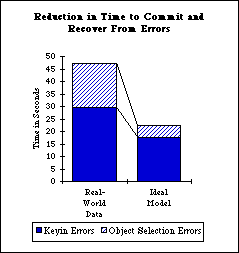
Figure 5. The estimated reduction in time due to fewer expected errors if we assume that error time is proportional to frequency.
The above analysis shows some important effects of using efficient strategies on performance. Efficient strategies appear to reduce mouse and keyboard inputs leading to a lower probability of errors, and reduction in the overall time to perform the task. This result is of value to CAD users such as B1 who frequently perform drawing tasks in a production mode. Users in our ethnographic study explicitly stated the importance of improving task execution time [3].
But how do strategies such as DAM enable users to reduce low-level inputs? We have stated earlier that an efficient strategy must exploit some capability provided by the device. What is the DAM strategy really exploiting?
Aggregation has been utilized by CAD developers to help users organize different types of information. Most engineering CAD systems provide hierarchies of predetermined aggregates such as design files composed of a fixed number of layers, and polygons, such as a rectangle, with a fixed number of sides that cannot be disaggregated into lines. They also provide user-defined aggregates such as graphic groups and fences that allow users to aggregate arbitrary graphic elements. Because of the pervasive use of aggregation in CAD systems, strategies of aggregation such as DAM become crucial to understand and use in order to exploit these new capabilities. The DAM strategy appears to be powerful as it can be used to exploit concepts like symmetry and three-dimensional projection [4] that are common in domains such as architectural design [9].
Researchers have stressed the importance of approaching computer-aided drafting differently from manual drafting. For example, Mitchell [14] describes the efficient use of CAD in terms of "virtuosity" or the skills to "form a structural conception of the object that is to be represented and to map this onto the token structures and construction operations provided by the medium" (pg. 60). The DAM strategy offers a concrete way of mapping the structure in a drawing such as symmetry, to the operations of aggregation and manipulation provided by CAD.
We are also not the first to recognize the advantage of aggregation. McLuhan, in his description of automation, foreshadowed the concept of aggregation when he observed that "Electric means of storing and moving information with speed and precision make the largest units quite as manageable as small ones" [11] (pg. 311). He concluded that automation "is a way of thinking, as much as it is a way of doing" (pg. 302). Clearly, the key advantage of aggregation is that it allows us to make the computer do many tasks automatically, thereby reducing the manual work involved.
The commands of aggregation along with strategies to exploit them can be referred to as the technology of aggregation. We found that this concept was not unique to CAD. Word processors provide tools to aggregate words into sections and paragraphs, and spreadsheets provide the ability to temporarily group columns in order to change their attributes as a group. Given the pervasive nature of aggregation, we were motivated to see if first, there were other strategies of aggregation besides DAM, and second, if these strategies generalized across applications.

Figure 6. Three strategies of aggregation that generalize across applications. Each cell shows an example of a task that can be performed using a strategy. The shaded cells represent situations reported in empirical studies where efficient strategies were not used.
At the top of Figure 6, we show examples of the Detail-Aggregate-Manipulate strategy. We have already discussed at length the advantage of this strategy to exploit structure in a drawing as well as two studies showing experienced CAD users who did not make use of it [4]. The same strategy could be used in a spreadsheet application to create a row of data, aggregate it into a range, and operate on the range using a formula. Cragg et al. [7] have shown that 55% of users in their study did not use the range option. In a word processor the strategy could be used to copy paragraphs of text across files.
Next, the Aggregate-ModifyAll-ModifyException strategy allows a user to exploit aggregation to handle exceptions. So, for example, if all except one of a group of elements need to share an attribute, it is better to modify all of them and then change the exception, instead of modifying each on its own. If an application supports selective disaggregation or the ability to drop an element from an aggregate, then an alternate version of this strategy is to aggregate a group of elements, drop the exception, and then modify the aggregate (Aggregate-DropException-Modify). We have evidence in our data (still in the process of analysis [2]) to show that this version of the strategy was not used for a highly repetitious CAD task. The Aggregate-ModifyAll-ModifyException strategy could also be used to modify the width of columns (as discussed earlier in the study on Lotus 1-2-3 users [15]) as well as in a word processor to handle exceptions during the font modification of a paragraph.
Finally, the Locate-Aggregate-Manipulate-Modify strategy in CAD could be used to exploit similarity in a drawing by copying a figure that is already drawn, and modifying it. Once again we have data to support the claim that this strategy is not used by CAD users (also in the process of analysis [2]). In spreadsheets, this strategy could be used to copy and modify complex sets of formulae. The formulae shown contain absolute and relative referencing of cells which can be modified and reused in another location. In word processors the strategy could be used to copy and modify a section containing complex formatting.
The above description of commands and strategies of aggregation provides a framework for understanding the technology of aggregation available in widely used applications. While there may be other strategies of aggregation, as well as other technologies to understand more fully, it provides the first step towards describing a way to show users how to move from a sufficient to a more efficient use of computer applications.
A close inspection of the empirical data and the concept of aggregation revealed strategies of aggregation that appear powerful and general. Besides strategies that generalize across applications, there may be others at weaker levels of generalization. At one level there may be strategies that generalize only within a class of applications such as CAD. At a still weaker level there may be strategies that generalize only for certain tasks relevant to a single package, for example, to deal efficiently with the idiosyncrasies of a product. We believe that training should explicitly include strategies at all these levels of generalizations as they could reduce the complexity of learning procedures. Carefully stated generalizations have been shown to be more effective than specific instructions to enable novice users to transfer knowledge to novel tasks [5]. However, the efficacy of such strategic training remains a question to be answered empirically.
In addition to providing strategies during training, we have suggested other approaches to enable users make more efficient use of computer applications [3, 4]. These include providing extrinsic motivation to learn better ways through improved management and peer interaction, as well as providing feedback through systems that detect and suggest remediations for inefficient usage. However, all these approaches directly benefit from an understanding and the explicit definition of the strategic knowledge necessary for efficient usage as we have described. Such a framework, therefore, may provide an important step towards enabling users to move from a sufficient to a more efficient use of computer tools, and captures at least some of what apprentices have for centuries learned through watching a master craftsman.
1. Anderson, J.R. Cognitive Psychology and its Implications. W.H.Freeman and Company, New York, 1990.
2. Bhavnani, S.K. How Architects Draw with Computers: A Cognitive Analysis of Real-World CAD Usage. Unpublished dissertation proposal, Carnegie Mellon University, Pittsburgh, USA, 1996.
3. Bhavnani, S.K., Flemming, U., Forsythe, D.E., Garrett, J.H., Shaw, D.S., and Tsai, A. CAD Usage in an Architectural Office: From Observations to Active Assistance. Automation in Construction 5 (1996), 243-255.
4. Bhavnani, S.K., and John, B.E. Exploring the Unrealized Potential of Computer-Aided Drafting. Proceedings of CHI '96 (1996), 332-339. 5. Catrambone, R. Specific Versus General Procedures in Instructions. Human Computer Interaction 5 (1990), 49-93.
6. Card, S.K., Moran, T.P., and Newell, A. The Psychology of Human-Computer Interaction. Hillsdale, NJ: Lawrence Erlbaum Associates, 1983.
7. Cragg, P.B. and King, M. Spreadsheet Modeling Abuse: An Opportunity for OR? Journal of the Operational Research Society 44 (1993), 743-752.
8. Doane, S.M., Pellegrino, J.W., Klatzky, R.L. Expertise in a Computer Operating System: Conceptualization and Performance. Human-Computer Interaction 5 (1990), 267-304.
9. Flemming, U., Bhavnani, S.K., John, B.E. Mismatched Metaphor: User vs. System Model in Computer-Aided Drafting. Design Studies (in press).
10. Kieras, D. A Guide to GOMS Model Usability Evaluation using NGOMSL. in M. Helander & T. Landauer (eds.) The handbook of human-computer interaction (Second Edition). Amsterdam: North-Holland (in press).
11. McLuhan, M. Understanding Media: The Extensions of Man. Signet, 1964.
12. Miller, D.P. and Swain, A.D. Human Error and Human Reliability. in Gavriel Salvendy (ed.) Handbook of Human Factors, New York: John Wiley and Sons, Inc., 1987, 219-250.
13. Miller, F. The Training of a Craftsman. John Lane Company, New York, 1906.
14. Mitchell, W.J. Computer-Aided Design Media: A Comparative Analysis. in Penz, E. (ed.) Computers in Architecture - Tools for Design. Longman, 1992.
15. Nilsen, E., Jong H., Olson J., Biolsi, I., Mutter, S. The Growth of Software Skill: A Longitudinal Look at Learning and Performance. Proceedings of INTERCHI '93. (1993), 149-56. 16. Norman, D., The Design of Everyday Things. Doubleday, New York, 1988.
17. Siegler, R.S., Jenkins, E. How Children Discover New Strategies. Lawrence Erlbaum Associates, New Jersey, 1989.
18. Wood, S. GLEAN - GOMS Language Evaluation and Analysis. University of Michigan, 1995.
|
|