CHI 97 Electronic Publications: Papers
``I'll Get That Off the Audio'': A Case Study of Salvaging Multimedia Meeting Records
Thomas P. Moran, Leysia Palen,* Steve Harrison,
Patrick Chiu, Don Kimber,
Scott Minneman, William van Melle, Polle Zellweger
Xerox Palo Alto Research Center
3333 Coyote Hill Road
Palo Alto, CA 94304
{moran,harrison,chiu,kimber,minneman,vanmelle,zellweger}@parc.xerox.com
*Department of Information and Computer Science
University of California
Irvine, CA 92697
palen@ics.uci.edu
ABSTRACT
We describe a case study of a complex, ongoing, collaborative work process,
where the central activity is a series of meetings reviewing a wide range of
subtle technical topics. The problem is the accurate reporting of the results of
these meetings, which is the responsibility of a single person, who is not
well-versed in all the topics. We provided tools to capture the meeting
discussions and tools to ``salvage'' the captured multimedia
recordings. Salvaging is a new kind of activity involving replaying, extracting,
organizing, and writing. We observed a year of mature salvaging work in the case
study. From this we describe the nature of salvage work (the constituent
activities, the use of the workspace, the affordances of the audio medium, how
practices develop and differentiate, how the content material affects
practice). We also demonstrate how this work relates to the larger work
processes (the task demands of the setting, the interplay of salvage with
capture, the influence on the people being reported on and reported
to). Salvaging tools are shown to be valuable for dealing with free-flowing
discussions of complex subject matter and for producing high quality
documentation.
Keywords
activity capture, audio recording, multimedia,
LiveBoard, meeting support tools, notetaking, salvaging, work process support.
© Copyright ACM 1997
MEETING CAPTURE AND SALVAGE
Our interest is how computational tools can support the natural, informal
activities that are inherent in human collaboration. The aim of the research
reported here is to create tools (1) to support and capture the free-flowing
activities of meetings and (2) to utilize the captured multimedia meeting
records effectively in the larger work processes in which the meetings are
embedded.
Meetings are productive because of their interactional character. The rapid
give-and-take of conversational exchanges produces insights and shared
understandings. However, it is often difficult to document the content and
process of meetings. The result is that there are lost opportunities to make
later use of much of the content--insights, subtleties, perspectives, needs,
decisions, reasons, caveats, and so forth--expressed at meetings, as well as the
modes of expression (enthusiasm, caution, etc.). We are exploring one approach
to this problem: to capture not only the written artifacts of the meeting, such
as prepared materials and notes taken at the meeting, but also audio and video
records of the course of activity of the meeting. Multimedia records provide a
rich resource with which to revisit the course of the meeting, to reexperience
and reinterpret its details, tenor, and tone. Our goal is to understand how
multimedia records can be used.(1)
Documenting meetings (e.g., taking minutes) is a common task. Some people
already use recorded materials, e.g., reporters who routinely use audio
recorders. But new technologies for capturing, indexing, and accessing
multimedia records can expand the ways with which recorded materials can be
worked. We call the new activity of working with captured records ``salvaging.''
The research challenge is to understand the nature and efficacy of this new kind
of activity and how it can be evolved into effective work practices.
Much of the emerging research in multimedia capture seems to take a cognitive
view of capture and salvage as a memory aid, such as studies testing the
retrieval of answers to specific questions (e.g., [7,15]). While we agree that there are research issues of human
memory, our view is that the capturing and salvaging of meetings needs to be
understood within the social and organizational context of the larger work
processes. The development of effective practices of capturing and salvaging
meetings must be done by interrelating them with other work practices.
Consistent with this orientation, we have devoted much of our research to a
particular case study, where we create and explore the use of capture and
salvage tools in the context of a real ongoing work process. The value of this
approach is that we can participate in the co-evolution of tools and work
practices that are effective in the work setting and can thus understand how
these kinds of tools fit into the social context of an extensive work
process.
WHAT IS SALVAGING?
Meetings consist of activities, such as speaking, writing on the board,
taking notes, moving around, coming and going, laughing, pointing to materials,
and so on. These activities can produce various artifacts, such as
drawings from the board, written notes, etc. Audio/video recordings created when
the meeting is captured become additional artifacts. It is crucial that meeting
capture tools also produce indices that can be used during salvaging to
access the specific activities of the meeting for replay. In our case, we use
timestamped representations resulting implicitly from the meeting activities,
such as taking notes, changing displays on the board, speaker changes, etc.
The central activity discussed in this paper is what we have called
salvaging (in the dictionary sense of ``saving for further use''). It
involves culling through the artifacts of a meeting to dig up useful pieces,
indexing them, relating them, rechecking them, organizing them, and creating new
materials with them. The notion of salvaging is richer than just retrieval or
browsing--it is an active process of sense-making
[12] of the meeting and making the important parts of the
meeting more easily accessible to potential consumers, who simply want
to ``read'' about the meeting.
The concept of salvaging, versus simple consuming, is valuable when the
artifacts of capture are not themselves easily
consumable.(2)
In many important meetings, the process and/or content is too complex, subtle,
inarticulate, and/or chaotic to allow the creation of accurate or understandable
meeting artifacts in real time.(3) The best the meeting
participants can do is create adequate indices into the activity to support
later salvaging.
The salvager's goals can vary considerably, depending on the anticipated
consumers and their needs. The salvager might want to simply ``clean up'' the
meeting artifacts to serve as meeting minutes. Other salvaging goals include
clarifying the rationale for meeting decisions, clarifying the attributions of
ideas, putting meeting statements in context, and filtering out sensitive parts
of the meeting record.
Salvaging can produce a wide range of artifacts that address different kinds of
consumers. The simplest artifact is a text report, which makes for quick
consumption. Or the salvager might want to create an index to allow a consumer
to selectively replay parts of the meeting. In this case, the salvager might
just need to clean up and more accurately timestamp the notes from the meeting
to serve as good entry points for playback. Or the salvager might want to go all
the way and create an elaborate multimedia presentation of the meeting or set of
meetings. In this extreme case, the activity of salvaging is like multimedia
authoring. In general, however, we believe that most salvaging is oriented more
to sense-making artifacts than to high-production-value presentations.(4)
Salvaging performance varies substantially depending on multiple factors, such
as whether the salvager was present in the captured session, the salvager's
expertise with the technology, the salvager's familiarity with the material
being discussed, the salvager's goals, and the type of event or meeting
captured. We will report on our studies of these dimensions of use and how they
shape different salvaging behaviors in a future paper. The present paper focuses
on a case study involving one salvager over a long period with evolving
expertise and utilizing materials of differing familiarity.
RELATION TO OTHER RESEARCH
We have been working on capture and salvage tools for many years, beginning with
the WhereWereWe system [8] (which focused on
playback during the captured event itself). We reported on the need for a
``confederation'' of cooperating tools to achieve effective capture in meeting
settings [9]. We reported on our longitudinal case study
of these tools in a real setting in [10]. However, in
[10] we focused on the issues of capture; in this paper we
focus on the issues of salvaging.
Schmandt and his colleagues have been working for many years on making audio
usable. In [4] they explore ubiquitously capturing audio
in the work environment, and they show techniques for accessing the audio. Using
the strokes on a sketching application to index captured audio (and video) was
first reported in the NoTime system [7]. The
Filochat system [15] used stroke indexing for
notes taken at meetings. The Audio Notebook [14]
is a paper-based portable notetaker that indexes captured audio. All of these
are oriented as personal tools.
More elaborate collaborative systems are also being explored. The Bellcore
Streams system [2] focuses on capturing the
audio and video of formal presentations in an auditorium setting. Various
automatic video and audio indexing techniques are used to create timeline-like
views of the presentations. The Jabber system
[5] captures video conferencing meetings. The research is
focused mostly on indexing the content of the meeting by putting the audio
stream through a speech recognizer and then applying a lexical analyzer to build
a tree of keywords that provide an index structure into the audio/video
records. Classroom 2000 [1] is a preliminary
effort at capturing the presentation materials and the audio in the classroom,
using a LiveBoard for presentation and palmtops or laptops for student
notetaking.
There are a couple of empirical studies. In [16] there is
a brief study of people searching for specific events in videotapes of real
meetings using a VCR, showing some of the strategies they employ. Whittaker et
al. [15] ran an experimental study of Filochat,
showing that indexed audio supported better recall, but took longer (there is a
similar result in [5]). [15] also
reports a naturalistic study of Filochat usage in nine meetings, and
there were indications that different people found it useful to ``salvage'' the
meetings. However, the evidence in the current literature about the nature and
utility of salvaging is scant.
THE CASE STUDY
We have put our capture and access tools to use by engaging with an ongoing work
process at Xerox PARC, the management of intellectual property. This is not a
controlled study, but a naturalistic, longitudinal study where the use of the
tools was determined by the demands of the work process.
The Work Process
PARC's management of intellectual property is a complex, ongoing process (see
[10] for a more complete description). Researchers are
encouraged to submit Invention Proposals (IPs) describing their
inventions, which are evaluated by peer review via Technology Assessment
Panels (TAPs) of technical experts from the labs. There are several TAPs
covering a wide range of technical domains, such as solid state devices, large
area electronics, image processing, software architectures, software
applications, and user interfaces. TAPs meet on a regular basis to review
submitted IPs, and the results are reported to inventors, managers, and patent
attorneys.
The central figure in this process is the coordinator of the process
(we call him C). His job is to keep the process running smoothly,
report to management on the status of intellectual property, and look for ways
to improve the quality and quantity of intellectual property by refining the
process and adapting better technological support.
There are two settings on which our project focuses: the TAP meeting and C's
office, where he writes his summaries of the meetings. C calls the TAP meetings,
in which an average of 6 members review an average of 6 IPs. The members bring
their annotated copies of IPs to be evaluated. In the meeting they consider each
IP in turn, discussing its value along many dimensions. There is much
give-and-take in the discussion, and members' views can change considerably in
the process of trying to reach a consensus. The discussions average about 15
minutes. They give each IP a summary rating, but there are always caveats,
suggestions, and actions. C manages the agenda, facilitates the IP discussions,
brings the group to consensus, and takes notes on the discussion.
C's most critical task is then to create reports summarizing each IP and its
assessment. These reports provide feedback to the inventors, inform the managers
and attorneys about new intellectual property, and help TAP members who
periodically prioritize the corpus of IPs. Creating accurate reports is an
extremely challenging task for two reasons. The first is the technical breadth,
depth, and subtlety of the subject matter in the TAP discussions. Although C, a
physicist, was formerly a researcher and is thus knowledgeable about some of the
technologies, he is a novice at others, such as software. Second, because of his
workload, C is often not able to work on a report until a month or more after
the TAP, by which time it is difficult to rely on his memory and his notes are
difficult to interpret.
Capture and Salvage Tools
In this study, capture took place in the group setting and salvage in the
individual setting. For the group, we set up a regular PARC meeting room for the
TAPs. There was a large table with audio microphones and a LiveBoard
[3]. C sat
near the end of the table, so that the TAP members could easily interact
directly with each other. We set up the following ``confederation'' of activity
capture and salvage tools [9,10]:
The LiveBoard ran the Tivoli whiteboard application
[11] to display pages of materials to support each TAP
meeting. The first page held the agenda of IPs, followed by a review page for
each IP on the agenda. The review page provided a form to record the rating, a
space for writing actions, and a space for notes of the discussion of the IP. A
Tivoli review page is shown in the upper left window of Figure
1. Every action in Tivoli, such as switching a page
(signaling that the TAP's attention was moving to another IP) or making a stroke
with the LiveBoard pen, was timestamped by Tivoli, providing index points into
the audio record. C preferred to take discussion notes with a keyboard at the
table. So we provided a laptop with our own notetaking application
[9], which timestamped the notes and dynamically ``beamed''
them and their timestamps onto the Liveboard, where the TAP members could scan
them. The timestamp for each note appeared in Tivoli as a clock
icon. During discussions, C typed a note, consisting of 1-5 lines, about
every 2-3 minutes.
For the individual setting, C was provided with a ``salvage station'' in his
office. The salvage station interface, shown in Figure 1,
presented the Tivoli display, a set of playback controls (play, stop, and
forward or backward 10 seconds), and a word processor for creating the IP
reports. The salvage station provided C with random access into the audio at the
index points. The main indices were the pages. By going to the Tivoli page for a
particular IP, C could play the discussion of that IP. Within the page, C could
use the beamed and handwritten notes as indices. Gesturing on any clock (in
front of a beamed note) or stroke caused audio to play.
Figure 1. Salvage Station Display

C could also use Tivoli as a workspace to create further annotations and indices
during salvaging. When a clock was created during salvaging, it indexed the
current playback time. Annotations could be typed or sketched anywhere on the
workspace, since Tivoli is a freeform editor. Figure 2
shows an example of a salvage artifact created by C. The typed notes on the left
were from the meeting. The clocks and annotations to the right were added during
salvaging.
Figure 2. Sample of Salvage Annotations. Annotations
added during the salvage session are red.
Some text is "encrypted" to mask proprietary data.
(Salvage on 11/17/95 of TAP meeting on 10/23/95)

Note that we are concerned in this paper only with the capabilities of
salvaging tools, not with the details of their user interfaces. User interface
issues will be discussed elsewhere.
Method
Conditions
We studied C's salvaging process under naturalistic working conditions. The
volume and complexity of C's job as manager of the IP evaluation process kept
him extremely busy. We wanted him to fit our tools into helping with the demands
of his job; we could not afford to impose a new routine on him under the guise
of experimental control. C managed his own schedule. The salvage tools were made
available to him for report writing in his own office.(5)
Although the use of these was left to his discretion, he did incorporate them
into his routine work practice.
C's report writing for a given TAP was distributed across sessions, locations,
and tools. He would work when he could find the time, he sometimes took work
home, and he sometimes worked on the text of reports without the need for
salvage tools. Our study focused only on the sessions where he used the salvage
tools.
Data
We used four sources of data in this study:
- We collected all the meeting and salvage artifacts (e.g., Figure 2).
- The salvage tools were instrumented to produce time-stamped logs of all user
interface operations.
- We interviewed C several times in his office (so he could refer to materials
he used); these interviews were audio taped. We also had frequent informal
discussions with C.
- Finally, we videotaped his salvage sessions. Cameras were mounted in his
office, and we provided a dedicated VCR. C was very cooperative and started the
VCR every time he salvaged.
Time Span
We first installed the capture and salvage tools in 1/94
[10], and they have been in continual use since then. The
present study of C's salvaging work focused on the period 3/95 to 12/95.
CASE STUDY FINDINGS
We present findings showing the intricate nature of salvaging work, how C's
practices developed over time, and how C responded to different content
domains.
C's salvaging practices were fairly stable at the beginning of the study period,
which we call his ``early'' phase (by which time C already had over a year's
experience with the tools). However, new practices emerged near the end of the
study period, which we call his ``late'' phase. We present here three salvaging
sessions representative of these phases and of the diverse content domains he
works with. The differences in C's work practices can be described in terms of
his strategies and pattern of activities.
Salvaging Strategies
C developed multiple salvaging strategies for working with the captured
meeting materials and creating his final reports. These include:
- Writing the final report while listening to the captured audio record and
reading the meeting notes.
- Creating annotations and audio indices in the meeting record while listening to
the audio.
- Writing the final report from textual notes only (meeting notes and any
additional annotations).
C employed these strategies in response to different conditions. For example, he
used strategy 3 when he had a particularly simple TAP (on a familiar
topic). Strategy 1 was employed mainly in his early phase, and he began to use
strategy 2 in his late phase. Strategy 3 was used to follow on the results of
strategy 2.
Listening Profiles
Different salvaging strategies result in different patterns of activities, such
as reviewing notes from the meeting, creating new text, choosing which part of
the meeting to listen to, and so on. We have found it useful to represent the
pattern of activities on a salvage profile, which plots the salvager's
activities on a graph with two timelines, the timeline of the salvage session
(horizontal axis) and the timeline of the meeting being salvaged (vertical
axis). A characteristic salvaging activity is listening to a playback of the
recorded audio. A profile showing the listening activities is called a
listening profile. Listening activities are shown as 45 degree lines
(indicating that the audio playback is at normal speed).
Figure 3. Profiles of Listening Patterns.

Figure 3 shows how listening profiles portray different patterns of salvaging
activity. The baseline pattern is to listen to the audio straight through from
start to finish. Salvagers often stop and restart the audio, they skip segments
of audio, and they relisten to segments of audio. Note that these four patterns
are all sequential: the salvager is basically conforming to the
sequential unidirectional structure of the audio. The last pattern is
non-sequential listening. In real sessions, we see mixtures of these listening
patterns.
Listening profiles of three of C's salvage sessions are presented in Figures
4-6. These profiles have additional information. The dashed horizontal lines
show how the TAP meetings were divided into segments discussing different
IPs. The grey areas highlight the fact that C's listening pattern shows that he
systematically attended to one IP at a time while salvaging. On the right of the
profiles of the first two figures are graphs plotting the number of times each
segment of the meeting audio was played during the salvage session.
Early Salvaging Phase
The two salvage sessions in Figures 4 and 5 are typical of C's early phase. The
first session deals with a software TAP and the second with a physics
TAP. Because of C's heavy workload at that time, both of these salvage sessions
lagged their TAP meetings by about two months.
Figure 4. Listening Profile of an "Early Software"
Salvage Session.
(Salvage on 5/19/95 of TAP meeting on 3/22/95.)
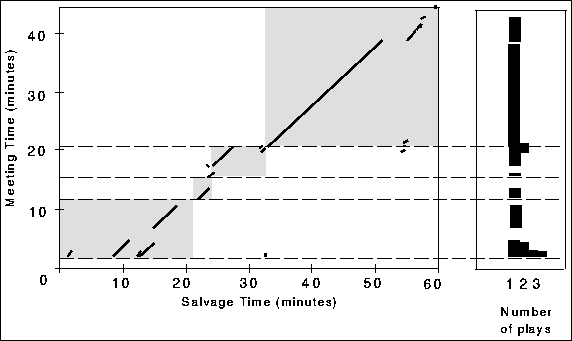
Note that in both of these sessions the pattern is sequential. C salvages the
IPs in the order they were discussed in the TAP meetings. Within IPs, he
proceeds through the meeting audio sequentially, with no skipping around. A
sequential strategy is the safest way to navigate through the audio data. It
makes it easy to keep track of what has and what hasn't been salvaged. Jumping
around the audio in a non-sequential fashion requires other props for keeping
track.(6)
C's strategy in both of the early sessions is to type the report in the word
processor while simultaneously listening to the audio (we can see this in the
video data). He goes straight to text by actively listening to the
audio and using the meeting notes and his own recall. Other features:
Features of the Early Software Salvage Session (Figure 4):
- C listens to almost all of the audio of the meeting.
- The listening pattern shows stops and starts. For example, at around
salvage minute 30, C stops for about six minutes. He heard the discussion of the
third IP wind up; he then consulted the hardcopy of the IP and completed the
text of his report before going to the next IP.
- C replays the audio, but only a little. For example, at about salvage
minute 10, C relistens to the first part of the audio. During his first listen,
he paraphrases the gist of the discussion in the report; then he goes back to
relisten for some better phrases to improve his text.
- While he types the report, he lets the audio play continuously in the
background, as can be seen at salvage minutes 35-50. Continuous play
allows him to listen for important points while also ensuring that he gets total
coverage of the material.
Figure 5. Listening Profile of an "Early Physics"
Salvage Session.
(Salvage on 5/12/95 of TAP meeting on 3/8/95.)

Features of the Early Physics Salvage Session (Figure 5):
- In contrast to the software session, C does not listen to all of the
audio. For example, he skips a large segment in the third IP; he decided from
what he had listened to that he had heard enough.
- He repeatedly listens to a particular segment of the meeting audio in the
first IP. For example, at salvage minute 10 he relistens in order to check the
text he just typed. He also creates a clock to index the replayed segment.
- There is an interesting case of faulty navigation in the audio in the
second IP. C starts on the second IP by typing some text (salvage minutes
17-21), and then he wants to listen at minute 21. Instead of gesturing on a
clock, he simply presses the play button, which plays the audio from the last
playpoint, which is still in the discussion of the first IP. It takes C a few
seconds to realize that audio is from the first IP. He decides to let the audio
play out while he occupies himself by organizing papers and by typing some
initial text for the second IP. By the time he hears the discussion of the first
IP coming to an end (minute 25), he has read the meeting notes for the second IP
and decided that the important point is in the fourth note, so he gestures on
the fourth clock to skip to that point.
Late Salvaging Phase
Figure 6 presents a listening profile of C's salvaging a
software TAP meeting 8 months later. This profile reveals an advanced salvaging
practice. From the video data, it is also apparent that C's behavior is quick
and skilled, with a dense mix of activities.
Figure 6. Listening Profile of a "Late Software"
Salvage Session.
(Salvage on 12/2/95 of TAP meeting on 11/29/95.)
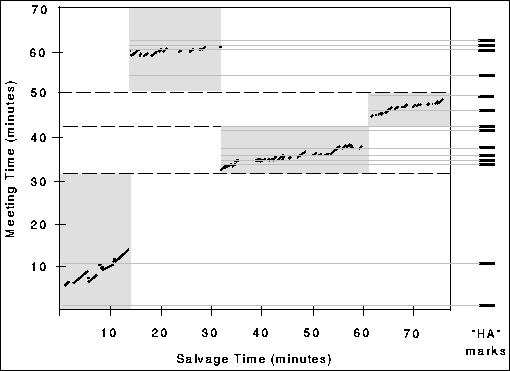
C was very focused, as he approached this session only 3 days after the TAP with
the issues he wanted to deal with fresh in his mind. C's strategy was to work
carefully at understanding particular segments of the meeting and with compiling
additional notes, which he added to the workspace on Tivoli (as in Figure 2).
He would then use these in a later session to write the
actual IP reports.
Features of the Late Software salvage session (Figure 6):
- In contrast to his early phase, C does not follow the meeting order in
salvaging IPs. He skips from the first to the fourth IP, apparently because this
was the order of IPs on his hardcopy of the meeting notes.
- C listens to only a small fraction of the audio record.
- C replays relevant segments of audio over and over. He backs up and
relistens to short segments while transcribing the spoken words next to the
meeting notes. C also creates clocks to mark the points where some of his
transcriptions begin. For example, in the third IP, C very carefully transcribes
a particularly technical description of software logic.
- C has evolved special marks in his meeting notes to locate the relevant
audio segments. The mark is ``HA'' (for ``hear audio''). (See Figure 2 for
examples of HA marks.) During the meeting, C would type HA to signal points he
thought were important, well-articulated or difficult to understand,
anticipating that he would want to revisit them during salvaging (7). Figure 6, on the right, shows when the HA marks were
created in the meeting. It can be seen that C uses the HA marks to focus his
listening activity. In some cases, the points he marked are no longer relevant
to him. In other cases, he uses the approximate location of HAs to localize his
salvaging activities.
In a later session, C used these salvage artifacts to write the actual IP
reports. We examined his final reports and found that about half the notes he
transcribed in the salvage session were incorporated fairly literally into his
final IP reports and constituted a significant portion of the resulting text.
Salvaging Different Content
During interviews, C told us that he felt much more at ease dealing with the
content material of the physics TAPs than the software TAPs. Familiarity with
content appears to be a strong determinant of the kind of salvaging strategies C
employs. These strategy differences became more pronounced over time. In the
early phase (Figures 4 and 5), we
see that he felt the need to listen to the audio of software TAPs more
completely. In his late phase, where he was trying to be more prompt and focused
in his salvaging, the differences have become more pronounced. C engaged in more
elaborate indexing and salvaging and made more use of the salvage artifacts in
the software TAPs. Figure 6 shows C digging deeply into
selected parts of the meeting audio to understand the technical arguments,
during which he creates further annotations on the salvage artifact. These
activities do not occur while salvaging the physics TAPs.
Figure 7. Three Measures of Salvaging in Different
Content Domains.
(The measures are averages per IP. A-D represent different TAPs.)
|
Physics |
Software |
|
A |
B |
C |
D |
| Written references to audio during the meeting |
.29 |
.40 |
1.51 |
1.29 |
| Annotation "chunks" created during salvaging |
.00 |
.00 |
.63 |
.95 |
| Clocks created during salvaging |
.00 |
.00 |
.49 |
.29 |
We have not presented an example of a late physics salvage session. Instead, we
show the differences between the two content domains in the late phase with some
summary data. The differences are clearly revealed by comparing measures of
various activities across a number of late phase TAPs. The measures are: the
number of explicit written references to the audio C creates during a TAP
meeting; the number of ``chunks'' of textual annotation C adds to the salvage
artifact while salvaging; and the number of clocks he creates on the salvage
artifact. We counted these features in C's salvage artifacts for a span of ten
months (9/95-6/96) in four different TAPs, two physics TAPs and two software
TAPs (balanced for frequency and dates). The table in Figure 7
confirms that C hardly ever engages in the more elaborate
salvage activities when dealing with the familiar physics content domain. In
fact, C claims that he often does not need to use the audio to report on the
familiar physics TAPs. The salvage tools are more valuable--indeed crucial--for
dealing with difficult and unfamiliar materials.
FURTHER OBSERVATIONS ON SALVAGING
The case study raises a multitude of general issues; many of these are concerned
with the relationship of salvaging to other people and work in the larger work
setting.
Evolving Practices for Efficiency
We saw in the Late Software salvage session that C uses the audio in a very
focused way to, as C says, ``mine for gold.'' He localized his search for
valuable pieces of information by flagging those ideas during the meeting by
using HA marks. Creating and using HAs is a practice that has evolved over
time. Early in his use of capture tools, C would often say during a meeting,
``I'll get that off the audio'', which signalled to the TAP members that C knew
something important was being said, even though he didn't take full notes on it
at the moment (he was frequently in the middle of typing an earlier
note). However, this utterance was not something he could later use as an index
into the audio. To create a useful index, he eventually began writing explicit
audio references, such as ``hear audio,'' in his notes during the meeting. One
meeting later, he shortened this to ``HA'' and added HAs to his regular
note-taking vocabulary. Other factors converged to make this practice work. C
was making a special effort to be efficient and to eliminate the delay in
producing reports. By starting to salvage soon after a TAP meeting, C was more
prepared to interpret the significance of the various HAs and hence to use them
effectively in salvage sessions. The development of the HA convention and the
strategy for using it is a prime example of his evolving practices. Over time he
developed many specialized strategies to deal with the particularities of the
different TAPs and different circumstances he encountered in the work
process.
The Salvage Artifact as a Workspace
C deals with many artifacts during salvaging: both in hardcopy (the IP, the
meeting notes, email) and on the workstation display (the meeting notes, the
draft text of the report), as well as the audio record. Managing and
coordinating these resources is part of his salvaging task. One way to organize
the various resources is to move any relevant information from all sources into
the report. However, C found that it was better to have an intermediate place to
assemble information during salvaging. He did this by adding annotations to the
workspace containing the meeting notes. From an interview with C, we can discern
that he did this to limit the complexity of having to simultaneously deal with
two different places, two different organizations, and two different tasks.
C uses the meeting notes to index into the audio. He is focused on this display
window and not on the report window. The meeting notes are ordered by the
discussion in the meeting, and he follows the discussion order to salvage,
whereas the draft outline of his report is often in a different order. C says he
is ``fishing for information'' when salvaging, and it is better not to try to
organize the information at the same time. Further, C claims that as ``you
listen to the material, you change the organization it is finally going to go
into ... so it is better to ... get all the fish out before you try to work with
them.''
Speed/Accuracy Trade-Off
C must balance the time he spends on his writing and the thoroughness and
accuracy of his reports--the classic speed/accuracy trade-off. Capture and
access tools allow, even encourage, greater accuracy. Whittaker's study
[15] showed that retrieval from captured audio was more
accurate, but his subjects stopped short of 100% accuracy (retrieval just took
too long). The larger work context is a strong determinant of where to strike
the balance. For example, for a period of time C experimented with ``quick
reports'' (brief reports produced without salvaging), but these were not
acceptable to the inventors, who wanted more detailed feedback. So C returned to
more detailed reporting. Salvage tools do not determine a particular place on
the speed/accuracy trade-off; it is up to the user to manage this. Good tools
can alter the trade-off curve somewhat, but perhaps more important is that they
allow users a greater range of possible places on the trade-off. The utility of
capture and salvage tools in a given work setting must be understood in part by
the speed/accuracy demands.
Salvaging as a Channel of Communication
We saw in the Late Software salvage session that C sometimes carefully
transcribes the words of TAP members, especially on topics less familiar to him;
and he uses these transcriptions in his reports. The practice of borrowing words
from the audio produces an accurate report of the TAP discussion, which is
appreciated by the inventors. But it also has interesting effects on the TAP
process. We reported in [10] that there is an awareness
of the audio in TAP meeting and that TAP members often seem to ``speak to the
record,'' that is, they address C in his future role as salvager as much as in
his current role as meeting facilitator. They are confident that C will ``get
it'' later, even if he doesn't at the moment. The result of creating such
accurate reports of the discussion is that there is no longer a need for TAP
members to critique drafts of the IP reports (something they needed to do
frequently before the use of our tools [10]). One TAP
member commented to us that C's reports using our tools better represent the
diversity of opinion that is expressed in TAP meetings. This is
important not only for the richness of the reports, but also for the
satisfaction of individual TAP members, who see their contributions being
explicitly used.
By being fairly literal in his reporting, C is attempting to use the language
that both the TAP members and the inventors speak.(8)
He is acting as a channel of
communication between them without distorting the signal. This implies that it
may be appropriate for the literal record itself to be transmitted, that is,
that salvaging could produce a multimedia report, appropriately filtered, that
directly and vividly communicates the richness of the discussion in the
meeting. This is indeed one of the goals of our current and future work.
Design Implications
The longitudinal study of one naturalistic salvaging context reported here
(together with other studies to be reported in a later paper) begins to provide
insights into important characteristics of salvage tools. Let us note two design
implications (among many) for salvage tools. First, tools should provide a
workspace to collect and integrate information. The workspace should serve as a
``staging area'' for organizing the information, but not require that the
information be organized as it is assembled. Second, tools should provide ways
for a salvager to manage, structure, and control the salvage process itself. In
particular, better tools for orienting and navigating within the audio channel
are needed. We have prototyped an improved timeline tool that identifies who is
speaking [6] and other meeting activities (e.g.,
notetaking, page turning). It would also be valuable to indicate which portions
of a meeting's audio were played in this (or previous) salvage sessions.
CONCLUSION
We have demonstrated a real-world use of tools to capture free-flowing
discussions of complex subject matter and salvaging tools to produce high
quality documentation. These tools are still in use and have become a vital part
of the work process. We have described the nature of salvaging in practice and
how the practices evolve; we have observed some general features of salvaging
activity; we have suggested some design implications for supporting salvaging;
and we have shown that salvaging cannot be thought of as an isolated task, but
that it is intertwined with the capture setting.
ACKNOWLEDGMENTS
We would like to acknowledge and thank colleagues who worked closely with us
during the project described in this paper: Chuck Hebel, Gordon Kurtenbach, Bill
Janssen, and Sara Bly. We thank the many TAP members for their supportive
collaboration and Annette Adler for many discussions and comments on this
paper.
REFERENCES
[1] Abowd, G. D., et al. (1996). Teaching and learning as multimedia authoring: the
Classroom 2000 project. Proceedings of Multimedia'96.
[2] Cruz, G., & Hill, R. (1994). Capturing and playing multimedia events with
Streams. Proceedings of Multimedia'94, 193-200.
[3] Elrod, S., Bruce, R., et al. (1992). LiveBoard: A large interactive display
supporting group meetings, presentations, and remote collaboration,
Proceedings of CHI'92.
[4] Hindus, D., & Schmandt, C. (1992). Ubiquitous audio: capturing spontaneous
collaboration. Proceedings of CWCW'92, 210-217.
[5] Kazman, R., Al-Halimi, R., Hunt, W., & Mantei, M. (1996). Four paradigms for
indexing video conferences. IEEE Multimedia, 3(1), 63-73.
[6] Kimber, D., Wilcox, L., Chen, F., & Moran, T. P. (1995).
Speaker
segmentation for browsing recorded audio. Proceedings of CHI'95,
212-213.
[7] Lamming, M., & Newman, W. (1992). Activity-based information retrieval:
technology in support of personal memory. Personal Computers and Intelligent
Systems: Inforemation Processing `92, 68-81. Amsterdam: North Holland.
[8] Minneman, S., & Harrison, S. (1993). Where Were We: Making and using
near-synchronous, pre-narrative video. Proceedings of Multimedia'93,
207-214.
[9] Minneman, S., Harrison, S., Janssen, B., Kurtenbach, G., Moran, T. P., Smith,
I., & van Melle, W. (1995). A confederation of tools for capturing and
accessing collaborative activity. Proceedings of Multimedia'95.
[10] Moran, T. P., Chiu, P., Harrison, S., Kurtenbach, G., Minneman, S., & van
Melle, W. (1996). Evolutionary engagement in an ongoing collaborative work
process: a case study. Proceedings of CSCW'96.
[11] Pedersen, E., McCall, K., Moran, T. P., & Halasz, F. (1993). Tivoli: An
electronic whiteboard for informal workgroup meetings. Proceedings of
INTERCHI'93, 391-389.
[12] Russell, D. M., Stefik, M. J., Pirolli, P., & Card, S. K. (1993). The cost
structure of sensemaking. Proceedings of InterCHI'93, 269-276.
[13] Sanderson, P. M., & Fisher, C., (Eds.) (1994). Special issue on exploratory
sequential data analysis. Human-Computer Interaction, 9, 247-472.
[14] Stifelman, L. J.
Augmenting real-world objects: a paper-based audio
notebook. Conference Companion to CHI 96, 199-200.
[15] Whittaker, S., Hyland, P., & Wiley, M. (1994). Filochat: Handwritten notes
provide access to recorded conversations. Proceedings of CHI'94, 271-277.
[16] Wolf, C., Rhyne, J., & Briggs, L. (1992). Communication and information
retrieval with a pen-based meeting support tool.
Proceedings of CSCW'92, 322-329.
Footnotes
- (1)
- We want to emphasize that we are
exploring multimedia in order to help people cope with the complexity of
freeflowing discussions. Media recordings are commonly used for quite different
reasons: for accountability, such as in legal processes ("anything you say can
be held against you") and security (surveillance). This is the very opposite of
what we are trying to achieve. We don't want to inhibit people by making them
feel accountable for every statement, but rather we want them to feel free to
discuss ideas and be able to revisit them. Thus, trust and understanding of how
captured records are to be used is crucial.
- (2)
- Part of our current research is
exploring tools that automatically identify and present artifacts from meetings
on the Web with little or no intermediate salvaging effort.
- (3)
- It should be pointed out that we do not
claim that all meetings are worth salvaging. An interesting phenomenon we have
experienced is that it is often difficult to know until after a meeting whether
there might be something worth salvaging.
- (4)
- Salvaging is also quite different from
the activity of sequential data analysis [13], such as
video analysis. A data analyst's goal is to create a detailed account of the
course of activity. Salvagers are more interested in the content and in
extracting the valuable parts and the context necessary for understanding those
parts.
- (5)
- We provided a separate Sun workstation
as the salvage station. C used a PC for most of his work. Although the
integration was not ideal, C was able to get data from one workstation to that
other. Most important was getting data into Lotus Notes, which held the IP
database.
- (6)
- A detailed examination of the video of
this session revealed that C did attempt to salvage the IPs in a different
order, using a hardcopy agenda as a guide. However, the meeting did not follow
the order of the hardcopy agenda; and C was very confused. He found it easier to
conform to the natural sequential structure of the audio medium to order his
work.
- (7)
- C also used HAs to mark parts of the
meeting that went too rapidly to take notes on. For example, in this session C
marked a time when a list of specific items was being rattled off; this list was
transcribed during salvaging and included in the report.
- (8)
- In fact, reports in the software area
are now longer and more detailed than in physics, where C is comfortable
paraphrasing and condensing without losing meaning.
CHI 97 Electronic Publications: Papers