CHI 97 Electronic Publications: Papers
WorldBeat: Designing a Baton-Based Interface for an Interactive Music Exhibit
Jan O. Borchers
Telecooperation Research Group
Department of Computer Science
Linz University, 4040 Linz, Austria
+43 732 2468 9888, +49 731 502 4235
jan@tk.uni-linz.ac.at
http://www.tk.uni-linz.ac.at/~jan/
ABSTRACT
This paper presents the interface design of the WorldBeat
system, an interactive exhibit about using computers in musical
education, and as musical instruments. The system allows even computer
and music novices to create aesthetically pleasing music, using a new,
consistent interaction technique: Visitors control the complete
exhibit using two infrared batons as pointing device,
conductor's baton, and musical instrument interface, making keyboard
and mouse unnecessary.
The paper summarizes special requirements when designing
computer-based exhibits, how we used batons as a new type of input
device to meet those requirements, and how user feedback iteratively
optimized the look and feel of the exhibit to convey its "message"
in an understandable and visually appealing way. We show how our
results contribute to "Looking to the Future" of HCI, and how they
could be of general use to other researchers and practitioners
designing user interfaces for interactive exhibits.
Keywords
interface design, interactive exhibit, baton, music, education.
© Copyright ACM 1997
INTRODUCTION
In recent years, interactive, computer-based exhibits have been
installed increasingly in museums and similar public
places. Especially many "Technology Museums" [2] use such
interactive systems to make today's and tomorrow's technology
understandable to the broad public. Typically, however, the target
user population of such installations has special knowledge neither in
computing, nor in the specific subject area that the exhibit
addresses. This puts special demands on HCI research and practice to
create systems that convey their message to visitors quickly and
easily.
The WorldBeat system described in this paper is a perfect
example of those exhibits: It was designed for permanent display in
the Ars Electronica Center (AEC) [6], a technology "museum
of the future", and its goal was to demonstrate to visitors how
computers can open up new ways to musical creativity, and musical
education, regardless of the visitor's prior musical knowledge.
This scenario called for a new interface technology that would be easy
to learn and use, and that was appropriate for a musical exhibit. We
met those requirements by developing a software system that uses the
input of two infrared batons to control the complete exhibit in
a consistent way, from menu selection to playing instruments and
conducting a piece of music. The system has been implemented
completely, and has been used under real-world conditions by thousands
of museum visitors. Many of them produced valuable feedback which we
used to further improve the system in terms of attractiveness and
usability.
Overview
The rest of this paper is organized as follows:
Background summarizes the ideas and goals behind the
Ars Electronica Center (AEC) and its KnowledgeNet
floor where the WorldBeat exhibit is located, its required
functionality, and a classification of the system. User
Interface Design Goals lists user interface requirements for
interactive exhibits in general, and for WorldBeat in
particular. Design Solution presents our idea to
solve this interaction design problem - using infrared batons, not
only as musical controllers, but also to replace mouse and keyboard
input. Implementation describes the system
architecture, how the batons are used, and how we solved major
software-engineering problems of this
approach. Evaluation gives some examples of user
feedback and improvements. Finally, Conclusion
summarizes the "lessons learnt" that may be of general use
to other designers of computer-based exhibits, and discusses how the
design of the WorldBeat interface can contribute to
"Looking to the Future" of HCI.
BACKGROUND
The WorldBeat exhibit is situated on the
KnowledgeNet floor of the Ars Electronica Center
(AEC).
The Ars Electronica Center
The AEC is a "museum of the future" [6], demonstrating to
the general public how information technology will change the way we
live, work, learn, relax, and communicate in the next century. It has
been opened in September 1996 in Linz, Austria. The AEC consists of
five floors, each addressing a different aspect of life - from a 3D
"Cave" in the basement that lets users experience virtual
realities with a focus on entertainment and scientific visualization,
to the "Sky Media Loft" café in the third floor with
a focus on personal and Internet communication.
The KnowledgeNet Floor
The second floor is taken up by the KnowledgeNet environment,
focusing on aspects of computer use in learning and working
environments. It has been designed and equipped by our Telecooperation
Research Group at Linz University. It consists of a
Class/Conference Room of the Future [10] demonstrating the
use of group support systems, teleconferencing technology, interactive
whiteboards, etc., and an area with WorldBeat and other
individual exhibits that deal with certain subject areas like new
media, new user interfaces, or new learning approaches, in more
depth.
The message we wanted to convey within this floor was that careful use
of information technology can improve learning in three fundamental
ways:
- Learning can become a more active experience, because
interactive systems can offer "learning by doing" for many
problems.
- It can become more cooperative as collaboration-aware
systems begin to provide means to learn together, both locally and
over distance.
- It may become more motivating since adaptive hypermedia
systems can present learning material in more interesting and
individual ways.
Details of this approach can be found in [10]. It had a strong
influence on the design of the WorldBeat user interface which
would have to convey this message by demonstrating these improvements
to the visitor.
The WorldBeat Exhibit
WorldBeat should be an exhibit that shows how computers can
support learning about music by playing it. Our next step, then, was
to decide on the functionality we wanted to offer to the visitor in
order to reach this goal.
Functional Requirements
We agreed on the following set of WorldBeat modules that
would each demonstrate a different aspect of computer use in music:
- The Joy-Sticks module allows the visitor to play
different "virtual instruments" directly. It demonstrates
how computers can be used to emulate traditional instruments, enhance
them with new controls, or create new ones.
- The Virtual Baton module enables the visitor to conduct a
piece of music. It shows that a computer system can play back a stored
score while leaving (rhythmic and dynamic) control over the actual
performance to the user.
- In the Query By Humming module, visitors hum the
beginning of a song, and the computer locates the complete piece in
its database. This demonstrates how computers can simulate human
musical recognition processes.
- With the Musical Memory module, visitors can test how
good they are at recognizing instruments through their sounds
alone. It is an example of a game-like courseware to learn about
music.
- In the NetMusic module, visitors can exchange
compositions with partners over the network, or even play together
with them online in special sessions. It demonstrates cooperative
possibilities of computer-based learning environments.
- Finally, using the Musical Design Patterns module, users
can change basic parameters of musical improvisation and performance,
e.g., the "groove" (swing) in a Blues piece, and they can
even improvise to the music without playing wrong notes. This module
shows that computers can offer a completely new way of creating music
that can be attractive and rewarding to all players, regardless of
their prior musical knowledge and abilities.
A detailed description of all these modules would be beyond the scope
of this paper; we will, however, describe later on how we made each
module available to the visitor via an appropriate set of user
interface metaphors.
Classification
For interactive systems in public spaces, or "kiosk
systems", a classification has recently been proposed by the
author [3] that distinguishes between four basic types, depending on
their main task. Those types are information,
advertising, service, and entertainment
kiosks which each have different implications on user interface design
guidelines, intended session duration, etc. In terms of this taxonomy,
interactive exhibits like WorldBeat can be defined as
entertainment kiosks, although with a certain information kiosk goal
that is "wrapped" into the interactive, game-like
experience. The implications of this classification are:
- The initial motivation to use the system is curiosity which the
exhibit has to arouse through a visually appealing and interesting
design, especially of the start page.
- The average time users spend at the exhibit should be
maximized (within reasonable limits) so that they use the
system long enough to pick up many of its "messages".
- The user interface has to be visually appealing and
simple at the same time, a combination that often leads to design
conflicts.
USER INTERFACE DESIGN GOALS
From the interaction designer's point of view, the problem now was to
create a user interface for the WorldBeat exhibit with the
following features and characteristics - we believe that our list
applies to interactive exhibits in general, and that it can be of use
when designing similar systems:
- consistent: Find a way so that the user can operate the
complete exhibit with its diverse functions in a uniform way, ideally
without having to change between different input devices.
- innovative: Exhibits have to attract passing visitors and
"lure" them into explore the system. In a technology museum,
an exhibit that features a standard computer, monitor, keyboard, and
mouse will hardly appear exciting to the passing-by visitor. The
affordances [11] of an exhibit, the actions that its user
interface suggests to the visitor, have to promise a new, unusual
experience.
- explorable: As deduced from the classification as
entertainment kiosk, once the user has started to examine the system
more closely, the interface, especially the user guidance and
navigation component, has to enable her or him to actively discover
successive exhibit features, offering new, motivating experiences
throughout the session.
- intuitive: Make the interaction principle easy to grasp
and use. Of course, this is a requirement for any interactive system,
but with exhibits it becomes crucial: If visitors who stop in passing
by to explore the system do not get along with it right away, they
will walk on and leave the exhibit alone. The statement that
"Users Are Cruisers" [9] who will leave an information space
quickly if unsatisfied with the presentation holds especially true for
museum visitors. As mentioned in the kiosk classification, this goal
often conflicts with the task to create an interesting, explorable
environment.
- comprehensible: Even if the exhibit is explorable as
stated above, a sense of closedness is important to provide
the visitor with feedback when an exhibit feature has been
successfully tried out, and a certain "message" of the
exhibit has been delivered. If this closedness is missing, visitors
will quickly lose track of the intended goal, and will not understand
what the exhibit wanted to convey, leaving it behind to walk on to the
next point of interest. In case of doubt this rule should dominate
over the goal of an explorative interface: The best presentation of a
message will be lost if the user got lost before reaching it.
- non-technical: In an already technology-oriented
environment, like the AEC, technical-looking exhibits scare away
visitors that are often computer novices. Especially an exhibit about
music can provide a refreshing counterpoint in this environment if it
manages to create a non-technical impression. This appearance can also
stress our concern that computers should not dominate learning, but
support it as creatively usable tools.
- domain-appropriate: An exhibit about music, for example,
should ideally use devices and interface metaphors that closely
resemble musical interaction of some sort, like playing or conducting.
- ability-neutral: The exhibit should be usable by visitors
of all ages and abilities. This means that the devices have to be
physically reachable and operatable also by small children and from
wheelchairs, and that the required accuracy of operation has to be
suitable for use with a range of motorical, aural and visual abilities
as wide as possible.
- exposable: Exhibits in public spaces like museums put
extreme demands on robustness, maintainability, and security. Whatever
the devices used are, they have to be sufficiently rugged to survive
sustained everyday use, including occasional accidents (like
involuntarily banging them against each other, or against a desk),
they have to minimize the learning effort and work load for the staff
to keep the exhibit up and running, and they have to be secured
against theft.
We extended these general design goals by items that reflect the
specific messages we wanted to convey through the exhibit:
- activity-oriented: According to our message, computers
should promote learning by doing. The interface can convey this if it
lets the user become active from the start, not just conceptually, but
also physically by requiring him or her to move and operate something,
and by letting the user learn about music by playing it.
- cooperative: We also declared that information technology
enables cooperative learning, both locally and over
distance. Composing (offline cooperation) and playing (online
cooperation) over the network is the subject of the NetMusic module in
WorldBeat, but the local cooperative aspect, which is often
underrepresented in exhibits, had to be stressed through interface
design: Several functions of the exhibit are designed for use by two
people simultaneously. This mode has to be made clear to visitors by
creating specially marked groups of setups that can be used by two
people. In fact, encouraging cooperative use should be a general
design goal for exhibits.
- fun: The third part of our message was that learning
could become a more enjoyable experience. This influenced not just our
selection of generally "enjoyable" musical styles to play
with, but also the interface design which includes metaphors to drum
away on a set of percussion instruments, etc.
All design goals were taken into consideration when we developed the
interaction principle for the WorldBeat exhibit that is presented in
the next section.
DESIGN SOLUTION
After we had considered the various constraints put onto the WorldBeat
user interface, we started to play around with different ideas on how
it could be designed. We eliminated keyboard and mouse interaction as
being too technical, conventional, inappropriate for music, and
inconsistent with using musical devices. Furthermore, we found that
textual input would not be necessary at all for the functionality we
had in mind, so it would not be necessary to bother the visitor with a
virtual on-screen keyboard at any time.
Looking into electronic instruments, we developed the idea to use some
MIDI controller for user input and navigation. (MIDI, for Musical
Instruments Digital Interface, is the standard format to describe
musical information and exchange it between synthesizers, sequencers,
and computers.) We first considered using an electronic drum
pad (an array of touch sensitive fields to be played as
electronic drums) whose shape would be reproduced on-screen. They have
been used successfully by similar exhibits that only deal with
drum-like input [14]. However, we abolished the idea because, even
though such pads can in principle deliver continuous controller
values, when operated by visitors with their hands, they can
essentially only be used as an array of buttons. This meant that users
would have had to control "sliders" for continuous values by
pressing pads as "up" and "down" arrows -
certainly not the most intuitive way to accomplish this type of
input.
Finally, we came up with the central new idea of the WorldBeat user
interface:
We decided to let the visitor control the complete WorldBeat
exhibit consistently using two infrared batons. This integrates
into one interface concept all major tasks occurring during
interaction with the exhibit:
- navigating through the hierarchy of the WorldBeat system,
choosing from selections, setting sliders, etc.;
- playing a number of virtual instruments;
- conducting pieces of music;
- improvising to some accompaniment.
In short, the batons work both as musical and
navigational input device. The visitor can use them to carry
out typical operations in the graphical user interface, e.g.,
selecting the Virtual Baton conducting module, and then use
the same baton to actually conduct the piece. This distinguishes the
interface of the WorldBeat exhibit from other baton-based systems like
the Digital Baton developed at the MIT Media Lab (see [8]
which also contains a comprehensive overview of other electronic baton
systems) that often offer more control over musical parameters, but do
not integrate musical and navigational interaction into a single
interface.
IMPLEMENTATION
Hardware Environment
The WorldBeat exhibit runs on an Apple Power Macintosh
8500/120 computer. A MIDI Interface connects it to a Buchla
Lightning II spatial MIDI controller [13] that consists of two
wireless, infrared batons (see Fig. 1), a tracker
unit that we attached to the computer monitor, and the base
unit that contains the controller interface and MIDI sound
module. The batons are battery-operated and each feature an additional
action button.The exhibit further consists of a microphone connected
to a Roland pitch-to-MIDI converter (for Query By Humming),
and standard audio equipment (amplifier, tape deck, speakers, and
headphones).

Figure 1: The Lightning II infrared batons.
Software Environment
We developed the WorldBeat software using the MAX
multimedia programming environment [4] by Opcode Inc., a development
system especially for applications that process MIDI data in
real-time. MAX supports visual programming for most standard
tasks. Applications are created as a hierarchical network of
patches that each process data (usually MIDI messages) in a
certain way.
User Interface Data Flow
The idea to use the infrared batons as navigational devices results in
the following data flow in the WorldBeat system (see Fig. 2):
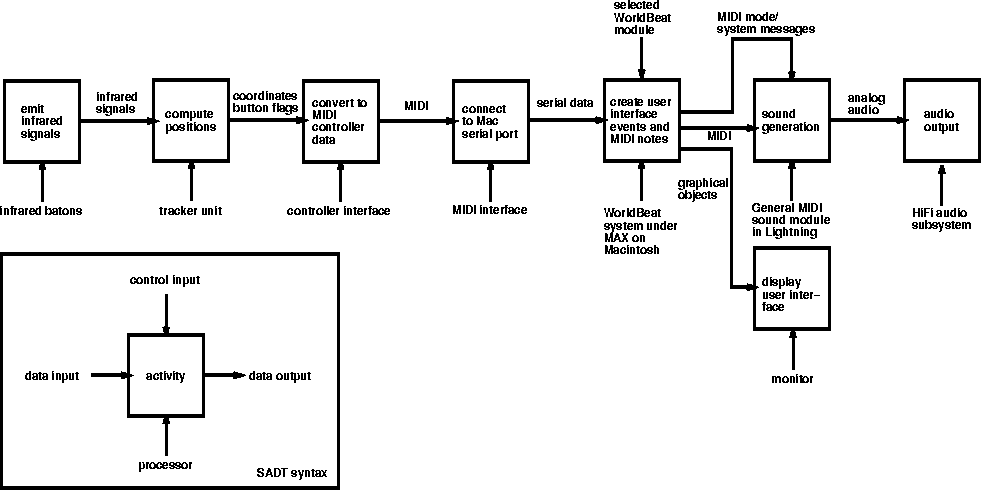
Figure 2: WorldBeat data flow diagram (SADT notation).
- The visitor stands in front of the exhibit (see Fig. 3), watching
the computer monitor, and gestures with the two batons in her
hands. Each baton contains infrared light emitting diodes that
continuously emit signals in all directions. Special signals are sent
when the action button on a baton is pressed or released.
- The infrared tracker, mounted directly below the monitor, measures
the angles at which it receives the signals from the two batons, and
converts these into horizontal and vertical position data with a
resolution of 128 steps in each dimension. It also uses the button
press/release events sent from the batons to determine the current
button states. This results in a stream of
(x1,y1,b1,x2,y2,b2)
tuples sent to the Lightning base unit, with coordinates
xi,yie{0,...,127} and button flags
bie{0,1}.
- The base unit converts those tuples into MIDI messages that
imitate four continuous and two discrete MIDI controllers, and sends
those out to its MIDI port. The unit also contains basic gesture
recognition which its presets use to directly create MIDI notes from
downward "beat" gestures. This is used by WorldBeat modules
that just require the user to play a virtual instrument with the
batons in a drumstick-like fashion.
- In the more advanced WorldBeat modules, the MIDI controller data
is sent via the MIDI interface to the Macintosh serial port, where it
is picked up by the WorldBeat system and interpreted in several ways:
The interface manager computes the cursor position on the screen
depending on the position of the right baton, and the currently
selected WorldBeat component usually uses the data to perform other
actions.
- All resulting events that describe MIDI playing messages are
finally sent back from the Macintosh via the MIDI interface to the
Lightning base unit. It contains a sound card with sampled instrument
sounds that follow the GM (General MIDI) standard for MIDI
instrument setups. The base unit creates the requested audio signals
that are then sent to the amplifier and loudspeakers, tape deck, or
headphones.
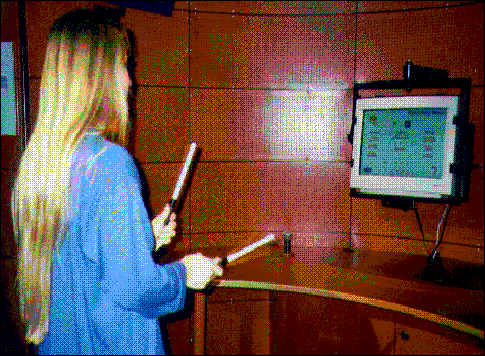
Figure 3: A visitor using the WorldBeat exhibit in the AEC.
Baton-Based Interaction With Instruments and Music
To explain how the visitor actually interacts with the system, the
following section describes the playing metaphors used in each
module.
When walking up to the exhibit, the visitor first gets a short
on-screen explanation how to navigate with the batons. Since
the Lightning system features two batons, we established the
convention that the right baton is always used for navigation, i.e.,
replacing the mouse. The visitor simply points at the screen where a
yellow spot shows the current cursor position, and presses the action
button to select something.
Playing virtual instruments in the Joy-Sticks module
uses metaphors that are built into the Lightning hardware and depend
on the instrument type. Instruments that are played with one or two
mallets (including drum kits, xylophones and similar
instruments) use a natural mapping: downward beat gestures play the
instrument(s) in a velocity-sensitive way. Chordal
instruments are either reduced to two-finger operation (as in one of
the piano settings), or a number of fixed chords are placed into 2-D
space and can be triggered by beat gestures at their position (as in a
guitar setup). Finally, instruments that in reality require some
different action to play a note (like wind-instruments) are simulated
using the action button on the baton to play a note, and the
2-D baton position information to control pitch and velocity
simultaneously.
Conducting a piece in the Virtual Baton module uses
a more refined gesture recognition than the one built into Lightning
to give exact control over the playback speed and dynamics of a
classical piece. The software tracks the right baton, concentrating on
vertical movement only, and plays the next beat each time it detects a
change from downward to upward movement. Gesture size determines
playback volume. The original algorithm was developed by a group of
computer music professionals [7]; we adapted it to be usable by normal
visitors and integrated it into WorldBeat.
Improvising in the Musical Design Patterns module
finally uses a new musical interaction metaphor: The visitor again
plays with downbeat gestures on an "invisible xylophone" in
front of him. The actual notes that are mapped onto the
"keys" of this xylophone, however, are constantly recomputed
by the system to fit into the current harmonic context of the
accompaniment. That way, the user has complete control over rhythm and
melodic shape of his performance, while the system modifies his input
with its own harmonic knowledge to create an aesthetically pleasing
result. For musical experts, this support can be switched off, showing
the adaptability of the system to different user experience levels.
In all modules, we supplied a visual interface that allows the user to
navigate through the functions easily and get online descriptions of
the current metaphor.
Interface Manager
Like all WorldBeat modules, the user interface component was
implemented as a hierarchical network of MAX patches. Since
MAX specializes in processing MIDI data, converting the MIDI
controller data from the right baton into a cursor position on the
screen was relatively easy. To create and manage graphical hypermedia
documents that could serve as user interface, however, we had to
extend MAX by implementing a new patch type interface
manager in C. It defines an object-oriented concept of
nodes (representing WorldBeat screen pages) that can
contain other text, image, movie and
button objects.
Buttons support three different states: normal, highlighted,
and activated. The `highlighted' state displays a short online help
when the user just moves the cursor over the button. The `activated'
state gives visual feedback when the button is actually selected
(pressed). An example can be seen in Fig. 4, the main
WorldBeat selection screen, where the user has just moved the
cursor over the Musical Design Patterns module icon. The
three-state-button concept keeps screen pages from being cluttered
with help texts, invites users to explore the exhibit, and still
offers a reasonable amount of online help and guidance.
Links are first-class objects and connect a button to a
target node that is displayed when the user activates the
button. Nodes can be derived recursively from other nodes, allowing
the interface designer to define templates with images and
buttons that are required on a number of similar pages. This approach
proved very useful for quick changes, e.g., to replace the
"back" arrow image on all pages simultaneously.
To define a node hierarchy for use with the interface manager, the
interaction designer specifes the desired objects in a textual
description file using a simple language. All images are stored
together with the description file (in its "resource fork"),
and referenced in the description text through a unique ID. For
example, the description file
template StandardPage 1001;

node StartPage StandardPage;

button NextButton 1002 1003 1004 100 80;

link NextButton NextPage;
defines a start page that uses a template containing the standard page
appearance (in the image with ID 1001), adds a button with image IDs
1002-1004 for the three different states, positioned at coordinates
(100,80), and links this button to a next page that would be defined
later in the file.
Once the interface manager has read this description file, it displays
the root of the specified node hierarchy, and processes incoming
events, like MIDI controller data from the batons, or a message to
display a certain object, and updates the display accordingly. At this
point, the user can begin to control the WorldBeat system using the
batons. If the user walks away, the interface manager jumps back to
the start page after a configurable amount of idle time.
Visual Design
For the visual design of the WorldBeat pages, we worked together with
a graphic design student. Using our ideas as input, she created logos
to represent WorldBeat and its modules. A major issue was to create a
non-technical look; we achieved this by scanning and rescaling her
hand-painted logos, instead of having her draw them using graphics
software. The designer created similar logos for the remaining
KnowledgeNet exhibits and for common user interface elements (buttons,
arrows, etc.) which helped to create a homogeneous appearance for the
complete floor.
The actual WorldBeat pages were then created using photo-retouching
software. The scanned material was combined with computer-rendered
texts into page elements that were copied as resources into the
description file. The WorldBeat interface manager assembles those
image elements at run-time into the final presentation form. This
modular approach proved much more memory-efficient than storing each
page as a complete, full-size image.
EVALUATION
Three types of evaluation took place in developing the WorldBeat
system and its user interface: During the design phase, we
continuously had novice users have a look at our interface and had
them use the exhibit modules that were already working. During the
opening week of the AEC, the author spent five days at the exhibit,
demonstrating its use to visitors and receiving direct feedback, but
also observing users and recording interaction problems and common
errors. Finally, a large survey among AEC visitors was carried out
which also asked them about their general judgement of the WorldBeat
exhibit. The three evaluation phases and their specific results are
discussed below.
User Feedback in the Design Phase
As soon as the functionality of the WorldBeat system had been
specified, we started implementing the various modules, and
concurrently created graphical design sketches to find an appropriate
visual representation. The design of the main WorldBeat page
where visitors select which module they would like to try out is one
of the best examples for the iterative nature of this process.

Figure 4: Main selection screen of the WorldBeat exhibit.
Fig. 4 shows a snapshot of the main selection screen in the final
design. Our first design had used hand-painted dark-blue
buttons, with a light reflection when highlighted, and that changed
their color to yellow when pressed. User feedback showed, however,
that the appearance was too dense and crowded, especially after
another module button was introduced. It was also considered as having
no connection to the subject field "music". Users liked,
however, the clear feedback the three-state buttons were conveying.
In a second design, we used musical objects like lines of a
stave as background images, and note heads in the foreground. Even
though the appearance became "lighter", the round note heads
still wasted too much screen space, leaving less space for the
explaining text. We solved this problem by displaying the text only in
the highlighted button state. This made the interface less crowded and
intimidating. When users asked us to include the icons of the various
WorldBeat components for better orientation, however, the overall
appearance again became too packed.
Finally, we abolished our initial assumption of a uniform
"button" area. Instead, we just used the icons themselves as
irregularly shaped buttons, and put the module title above them. When
highlighted, the icon fades into the background, and the explaining
text is displayed in front. This effect makes use of color to create a
spatial effect, and to direct attention to the newly appeared text, as
demonstrated in [15], and presented in more detail in [1]. Pressing
the button finally changes the text color from red to blue. When
compared to the other alternatives, this design produced the best user
feedback, especially in terms of visual attractiveness. This is the
design shown in Fig. 4.
Many other details of the user interface were determined in a
similarly iterative and experience-based process. For example, we
replaced the initial Helvetica sans-serif font by a brush-like script
font for a more non-technical impression, and the colors of interface
objects were not only determined by theoretical models, but also
influenced by consistency requirements imposed on all KnowledgeNet
exhibits.
Detailed User Feedback in Observations
During the opening week of the AEC in September 1996, the WorldBeat
exhibit was first exposed to use by the broad public. Apart from minor
memory leaks in MAX that could be overcome through automatic
restarts every night, the system proved to be stable enough for use as
a permanent exhibit. The author demonstrated the system to over one
thousand visitors, and watched several hundred people of virtually all
ages end levels of experience - both in computers and in music -
exploring the system on their own. These observations led to a number
of further improvements.
Acceptance of Interaction Metaphors
Thanks to the direct visual feedback, users showed few problems with
our navigation metaphor, although to use the full resolution
of the tracker, the pointing direction is not always exactly the same
as the location of the on-screen cursor. We also enlarged some
interface objects (like the "back" arrow) and moved them
towards the screen center to reduce problems that some visitors had
with their selection.
Playing instruments was understood immediately when the
mapping was natural, as with a drum kit, etc. Several visitors asked
for better visual feedback; we are working on a better visualisation
than just the current on-screen cursor. Playing chordal instruments
was less obvious and required reading the short explanation on the
screen. In a guitar setup, many users held the baton sideways as if
strumming a real guitar. However, this posed no problems since the
batons have infrared transmitters in all directions.
Conducting proved more suitable for musically inexperienced
people since it just required moving one baton up and down. However,
the system reacts to the "turn-around" at the bottom of the
gesture, and not to the downward motion (professional conducters work
that way too since it gives a more exact timing). People thought the
system reacted with a delay, until we compared the triggering gesture
to "pulling a fish on a rod out of the water" in the online
help.
Improvising in the Musical Design Patterns module
finally turned out to be the most attractive component. Users enjoyed
"jamming" with a blues band without playing wrong
notes. This module seems to have found the right balance between free
user input and system guidance. With freedom in rhythm and melodic
shape, nobody cared that the keyboard constantly changes to offer a
matching scale.
Other User Interface Improvements
We introduced audio feedback for the action button to give users a
hint that the system had processed their input.
When small children or people in wheelchairs used the batons, the
tracker did not recognize their input because it was below its sensor
field. We fixed this by reconfiguring it to reach from 50cm to 150cm
above the floor, with a width of about 150cm. Also, people would
sometimes stand too far away or too close to the tracker, impairing
tracking data quality. We added a line on the ground, indicating a
good position to stand on when using the exhibit (which is now also
mentioned on-screen).
Watching visitors exploring the exhibit on their own confirmed what we
all had feared: Users Don't Read Instructions - until they have no
idea anymore what to do next. We used this behaviour to redesign our
online help. On the one hand, we added short introductory pages that
the user would have to pass through to get to a specific module. This
way, our "message" was likely to be at least skimmed. On the
other hand, we added very short instructions on pages where visitors
actually use the functions, to reduce the need to memorize prior
instructions. We also made many phrases simpler and more
action-oriented, e.g., "vertical movements of the right wand
strum the strings of a virtual guitar" became "move the
right wand up and down to play a guitar".
The fact that the batons serve as navigational and musical input
devices simultaneously posed no problems to most visitors, probably
because they always concentrate on only one aspect - either
navigation, or making music - of the interaction at any time. With
good online help on how to use an instrument, the "mode
change" seemed natural.
Overall User Feedback in Surveys
After the opening week, the AEC conducted a survey among
visitors. Each of the 13 major exhibits was given a grade from 1
("very easy to understand, very interesting") to 5
("very complicated to understand, very uninteresting"). The
104 participants gave WorldBeat an average grade of 2.08,
i.e., the second best grade possible (std. dev. sigma=1.12).
The participants were also asked to list their three favorite
exhibits. Here, WorldBeat reached the third position, with 13.5% of
the participants listing it in their "Top Three" list. Only
the two million-dollar virtual reality installations in the AEC - the
3D Cave, and a VR flight simulator - were listed more often. We
consider this remarkable success of an exhibit whose hardware can be
purchased for around 15000US$ a result of our design that focused on
conveying a learning experience as outlined in our initial message:
activity-oriented, cooperative, and fun.
CONCLUSION AND FURTHER RESEARCH
We identified special user interface design goals for public
computer-based exhibits: To be attractive to visitors, they should be
innovative, explorable, activity-oriented, cooperative, and simply
fun. To ensure usability, they should be consistent, intuitive, and
comprehensible, but also non-technical, appropriate to the exhibit
domain, ability-neutral, and exposable. The interface of the
computer-based WorldBeat exhibit about computer use in music,
which was described in this paper, shows that using a domain-specific
device like infrared batons not only for domain-specific, musical, but
also for general-purpose, navigational interactions can result in a
new type of interface that helps to fulfil the above requirements to a
much higher degree. We also showed how design iterations and intense,
personal contact with users helped us meet those requirements.
The surprisingly positive feedback from AEC visitors, especially on
our Musical Design Patterns module, confirmed our belief that
a more abstract and structured representation of music (and other
multimedia data), together with new metaphors to interact with this
representation, is the key to a new generation of interactive
multimedia systems. We are continuing our research in this
direction.
When "Looking to the Future" of HCI, the WorldBeat interface
design points out a number of important directions:
- It shows the design, implementation, and evaluation of a new input
device that allows users to interact with musical systems in an
integrated and intuitive way;
- it shows that the new type of interactive systems for public
spaces may require re-evaluation of established design guidelines, and
suggests a set of guidelines for discussion;
- it involved a diversity of disciplines, from software developers
over graphic designers, to musical experts;
- it shows how to use computing power in a new way - to create
systems that do not have to be "programmed" to create music,
but that can be used as interactive, intelligent, and adaptive
instruments that don't replace but augment the range of classical
instruments;
- it demonstrates an interface suitable for a wide range of physical
abilities, that can be of advantage to all people;
- it is a living example of how HCI technology may change people's
learning and leisure activities (e.g., hobby conductors could now
actually control an orchestra instead of just conducting alongside a
fixed recording!);
- it shows that HCI can create systems supporting a more active,
cooperative, and motivating learning experience;
- and the non-technical appearance of WorldBeat shows how
HCI can help lowering the anxiety threshold that still keeps large
parts of society away from exploring and using computer systems for
their own needs.
ACKNOWLEDGMENTS
The author would like to thank Prof. Max Mühlhäuser, head of
the Telecooperation Research Group at Linz University, who established
the AEC KnowledgeNet project as an environment for the WorldBeat
system, and Günter Obiltschnig and Harald Hattinger who worked
extra hours on the implementation and installation. Thanks also to all
other internal and external contributors, especially Guy Garnett,
University of Illinois, and Asif Ghias, Cornell University, who made
the WorldBeat project a reality.
REFERENCES
- Albers, J. Interaction of Color. Yale University Press, New Haven,
CT, 1975.
- Bell, T.E. US science and technology museums visitor survey,
IEEE Spectrum, Vol. 32, September 1995, 50-71, and October
1995, 48-71.
- Borchers, J., Deussen, O., and Knörzer, C. Getting It Across:
Layout Issues for Kiosk Systems. In: Proceedings of the Workshop on
W3-Based Online Kiosk Systems, Third International World-Wide Web
Conference, Darmstadt 1995. Reprinted in: SIGCHI Bulletin,
Vol. 27, No. 4, ACM Press, October 1995, 68-74.
- Dobrian, J.C. MAX Reference Manual. Opcode Systems, Inc.,
Palo Alto, CA, 1995.
- Ghias, A., Logan, J., Chamberlin, D., and Smith, B.C. Query By
Humming - Large Musical Information Retrieval in An Audio
Database. Proceedings of the ACM Multimedia 1995 (San
Francisco, CA, November 5-9, 1995), ACM Press, New York, 1995,
213-236.
- Janko, S., Leopoldseder, H., and Stocker, G. Ars Electronica
Center: Museum of the Future. Ars Electronica Center, Linz,
Austria, 1996.
- Lee, M., Garnett, G., and Wessel, D. An Adaptive Conductor
Follower. Proc. of the International Computer Music
Conference, 1992.
- Marrin, T. Toward an Understanding of Musical Gesture: Mapping
Expressive Intention with the Digital Baton. Master's thesis, MIT
Media Lab, Boston,1996.
- McAdams, M. Information Design and the New
Media. Interactions, Vol. 11, No. 4, ACM Press, 1995,
36-46.
- Mühlhäuser, M., Borchers, J., Falkowski, C., and Manske,
K. The Conference/Classroom of the Future: An interdisciplinary
approach. In: Proceedings of the IFIP Conference "The
International Office of the Future: Design Options and Solution
Strategies" (University of Arizona, Tucson, AZ, USA,
Apr. 9-11, 1996), Chapman and Hall, 1996, 233-250.
- Norman, D.A. The Psychology of Everyday
Things. BasicBooks, 1988.
- Reider, D.J. The New Surf Music: Improvising on the
Net. TECHNOS Quarterly Journal, Agency for Instructional
Technology, USA, Summer 1995.
- Rich, R. Buchla Lightning II. Electronic Musician,
Vol. 12, No. 8, Cardinal Business Media, Emeryville, CA, August 1996,
118-124.
- Roh, J. H., and Wilcox, L.
Exploring Tabla Drumming Using Rhythmic
Input. Proc. of the CHI '95 (Denver, CO, USA, May 7-11,
1995), ACM Press,1995, 310-311.
- Shubin, H., Falck, D., and Johansen, A.G. Exploring Color in
Interface Design. Interactions, Vol. III, No. 4, ACM Press,
July+August 1996, 36-48.
CHI 97 Electronic Publications: Papers